
Social media managers are juggling multiple plates at once every day:
- brainstorming content ideas and creating text and video content
- scheduling posts and engaging on multiple social media accounts
- analyzing social media marketing performance and tweaking strategy based on data
- …And a lot more
Whew. It takes some elbow grease to keep the wheels spinning.
But what if you don’t have to do all that every single day? What if you could automate the mundane, repetitive tasks to social media tools and focus on your core jobs that actually move the needle toward your return-on-investment (ROI)?
Enter: Social media automation aka using software to automate repetitive tasks like scheduling posts, measuring performance, storing ideas, etc.
This article will share ten tasks you can automate in your social media management strategy to free up some headspace and clear up that to-do list.
Jump to a section:
- Why do you need social media automation?
- 1. Use digital bookmarks to save content ideas
- 2. Use social media listening tools to stay on top of niche trends
- 3. Use social media scheduling tools to publish your posts
- 4. Use social media analytics tool to analyze your performance
- 5. Use AI to refine your social media captions
- 6. Use chatbots to provide quick social media customer service
- 7. Use templates for faster content creation
- 8. Use social media collaboration tools to work with your team
- 9. Use social media monitoring software to track brand mentions
- 10. Use influencer discovery software to find creators
- The best social media automation tools you can use
Why do you need social media automation?
Social media automation has plenty of benefits. Here are the top three:
- Saving time: Take a simple task like social media scheduling. On the surface, it doesn’t sound like a lot of time saved. But when you think about publishing posts for multiple social media platforms over a long period of time, you get back a lot of hours.
- Less prone to human error: Social media managers are doing a lot, to put it mildly. It’s not unfair to assume you might forget to reply to a message or post on a new network because of the length of your to-do list. When you use a social media automation tool to manage your tasks, you shrink your margin of error significantly.
- More time for the fun (and more impactful) stuff: Relying on social media automation to do the repetitive tasks gives you more freedom and time to use your energy for the fun and more impactful tasks — like creating content and speaking to your target audience.
Automation puts the wind in the sails for your social media marketing efforts. Let's dig into the meaty stuff now and talk about the actual tasks on your never-ending to-do list you can outsource to a social media automation tool.
1. Use digital bookmarks to save content ideas
Imagine you saw an inspo post or piece of content that’d be perfect for your social media campaign. Then, life happened (Slack pings, laundry is done, someone has commented on your post…you get it). That A+ content idea or inspiration is now lost in the abyss.
Collecting and storing the right ideas when they strike you (or when you stumble on them) is one of the most important tasks in social media management. It’s also one of the easiest to get lost in the shuffle.
The solution:
- A digital bookmark tool to save all your web links. You integrate it in your browser and save any idea you like in one click. This not only ensures you never lose a beloved piece of content, but also gives you a collection of social media post ideas to tap into when you’re creating content.
- Buffer’s Create space to store any content ideas you get while walking the dog, showering, or doing the dishes. Can you use an ordinary Notes app for this social media task? Of course. But Buffer can become your one-stop social media management suite — meaning you can store ideas, create posts, engage with your audience, track your social media performance, and even create your link in bio all from one tool.
In a digital bookmark tool (like Raindrop) and in Buffer, you can organize your ideas into collections or group them using tags. This way, when you finally sit to batch-create your social media posts, you can find specific ideas for your various content pillars in a jiffy.

Social media automation tools I’d recommend for this task: Raindrop, Buffer.
2. Use social media listening tools to stay on top of niche trends
Social listening means observing what your audience is saying online and creating content around it. For instance, if you’re a haircare creator, you might notice trends around using rosemary water for hair growth and create a TikTok video on the topic.
But how do you know what’s hot and trending in your industry? Yes, there are several newsletters you could subscribe to. And sure, if you’re spending time online everyday and working in a specific niche, you’d know what’s up — to a certain extent. It’s still easy to miss a beat or two.
But there’s a better way to stay on top of trends than scrolling for multiple social networks every day for hours: Social listening tools. These automation tools help you uncover what your audience is searching for, what they are excited about, and related questions on a topic.
Many social media tools also contain trending topics with in-depth data on which terms & topics are trending — like Google Trends for social media.
⚡ Pro-tip: Many social networks also help you do this for their specific channel like Pinterest’s trend forecast and Instagram’s “Reel Trends” feature.
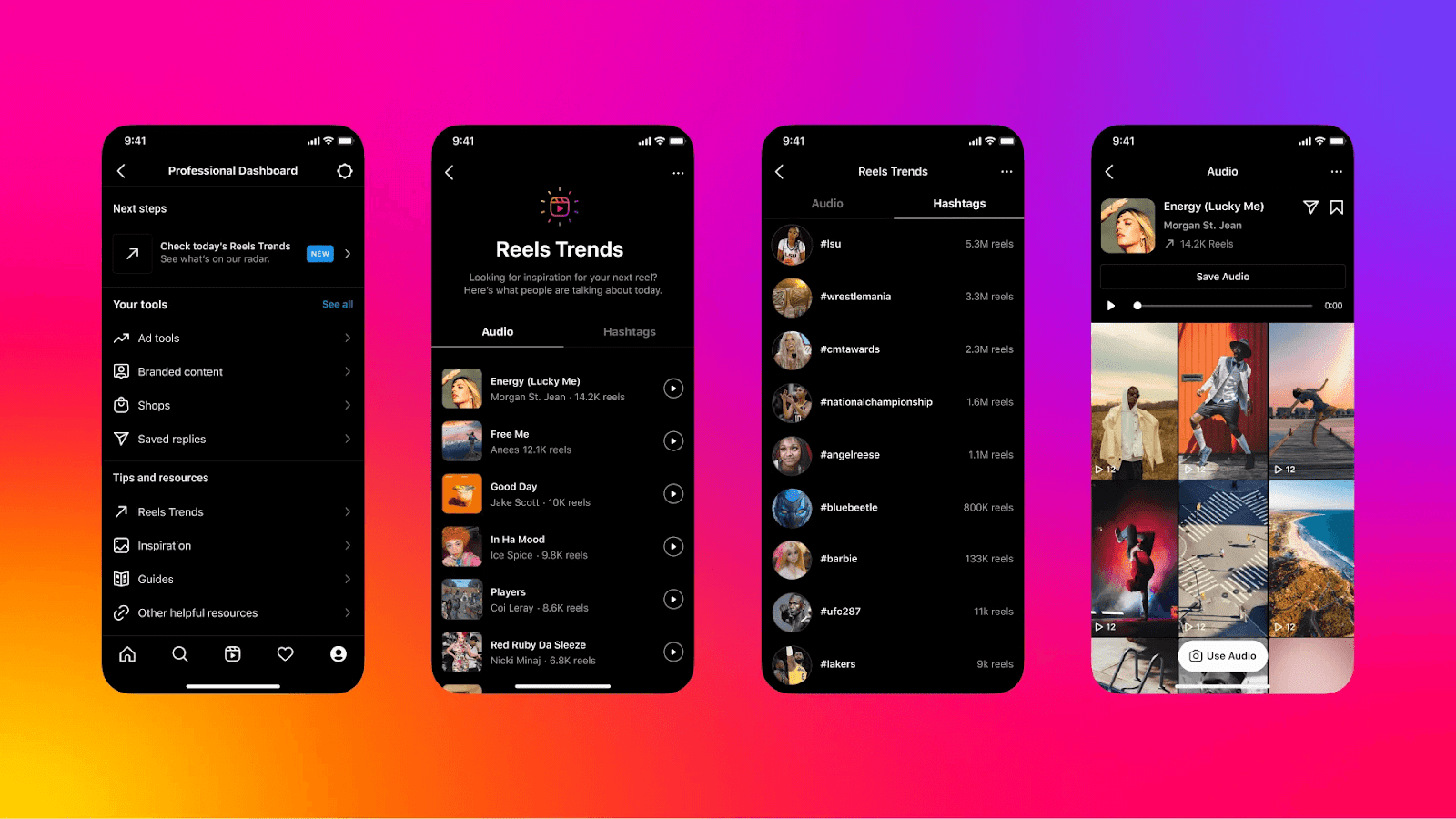

Keep an eye out for trends by spending time engaging with your audience on your social media accounts and scrolling for sometime. Match this data with your findings from social listening tools.
Social media automation tools I’d recommend for this task: Exploding Topics, SparkToro.
3. Use social media scheduling tools to publish your posts
Scheduling posts is the easiest social media task you can automate. Many social platforms, like Instagram and LinkedIn, natively provide you the option to schedule posts in advance. But I wouldn’t recommend automating natively within social channels. Here’s why:
- Lack of visual planning: Social media networks don’t offer a drag-and-drop content calendar feature, making it tough to see and adjust your schedule at a glance.
- One-stop scheduling is sloooow: If you’re a creator or social media manager, you’re likely maintaining a consistent social media presence across multiple social networks. Scheduling posts natively on each channel can be too time-consuming for your workflow. Using a scheduling tool, you can plan content for multiple platforms in one place, saving time and reducing context switching. This feature is especially helpful if you’re cross-posting the same social media post across multiple channels.
Now, the market’s saturated forehead-deep with social media publishing tools. Use the one that gets you the most bang for your buck. I recommend Buffer because:
- It’s easy to use — there’s no time wasted in a learning curve
- It lets you create custom posts for each network (if you wish to)
- It’s a leader in releasing integrations with new social media platforms
- It has a free tier and even its paid plans are quite affordable for small businesses
- It’s a full-fledged social media management tool so you can do multiple tasks with just one software

Whichever tool (or native feature) you choose, scheduling posts is the easiest social media task to automate. And it’s beginner-friendly because it doesn’t require you to relinquish a lot of control. So, if you’re just beginning with your social media automation strategy, begin by automating publishing your posts in advance.
Social media automation tools I’d recommend for this task: Buffer.
4. Use social media analytics tool to analyze your performance
Analyzing your social media metrics plays a big role in improving your strategy. You want to know how many likes, shares, comments, and saves your social media posts received. Robust analytics on every post can help you find patterns and recognize your best-performing topics, what your audience resonates the most with, etc.
Collecting and dissecting your performance numbers natively is a tedious task. You have to note the performance data for posts on every social media account you have and then find patterns across multiple platforms.
Social media analytics tools can automate collecting and analyzing all your performance metrics so you don’t have to do the math yourself. You’ll still need to tie back how your social media efforts contribute to your larger goals, but you can easily outsource the “gather how my posts are doing” job.
In Buffer, you can set a timeframe and not only see the basic metrics like impressions, likes, yada yada, but also get answers to questions that actually matter — like, “Which is the best type of post for this social media channel?” or “At what time should I post to get the most social media engagement?” and even “How often should I post?”

All of these answers are tailored to you and your social media accounts. The more you use Buffer, the more data you’ll have to make calculated insights into what’s working the best in your social media strategy.
Gathering insights from the analysis to optimize the social strategy is your wheelhouse. But gathering those metrics? Delegate that to a software.
Social media automation tools I’d recommend for this task: Buffer.
5. Use AI to refine your social media captions
AI is a big part of work today everywhere and social media management is no exception. You can use AI assistants to:
- Populate popular hashtags in a category
- Write the first draft of your social media caption
- Refine your existing copy to be more clear and concise
- Generate post ideas by giving a simple prompt of your niche
- Repurpose posts from one social media account for multiple platforms
The likes of ChatGPT are good for this, but many social media management platforms (like Buffer) are also AI-powered. Buffer, for example, comes with an in-built assistant so you can do all of the above tasks without switching a single tab.

Many AI tools have excellent capabilities, but remember you can’t automate the task completely to them. Add your human voice and niche expertise into the mix. Read more about how we use AI at Buffer to strike the balance between automation and human.
Social media automation tools I’d recommend for this task: ChatGPT, Buffer.
6. Use chatbots to provide quick social media customer service
If you’ve used social media for customer service for even one day, you know the need for a chatbot that can quickly reply to customers’ comments and DMs, redirect them to the right help article, and sell products.
Instagram has a native feature to help you set up frequently asked questions (FAQs) in your chat box. When someone starts a chat with you, they will first see the commonly asked questions and can tap for an automated reply (which seems real-time).

But it’s not flexible or adaptable for various use cases. For a better social media engagement strategy, you can use either:
- A DM automation tool that automatically replies to customers’ comments or DMs with the right link or content. You know those “comment for link/access” types of social media posts — you can create them using a DM automation tool.
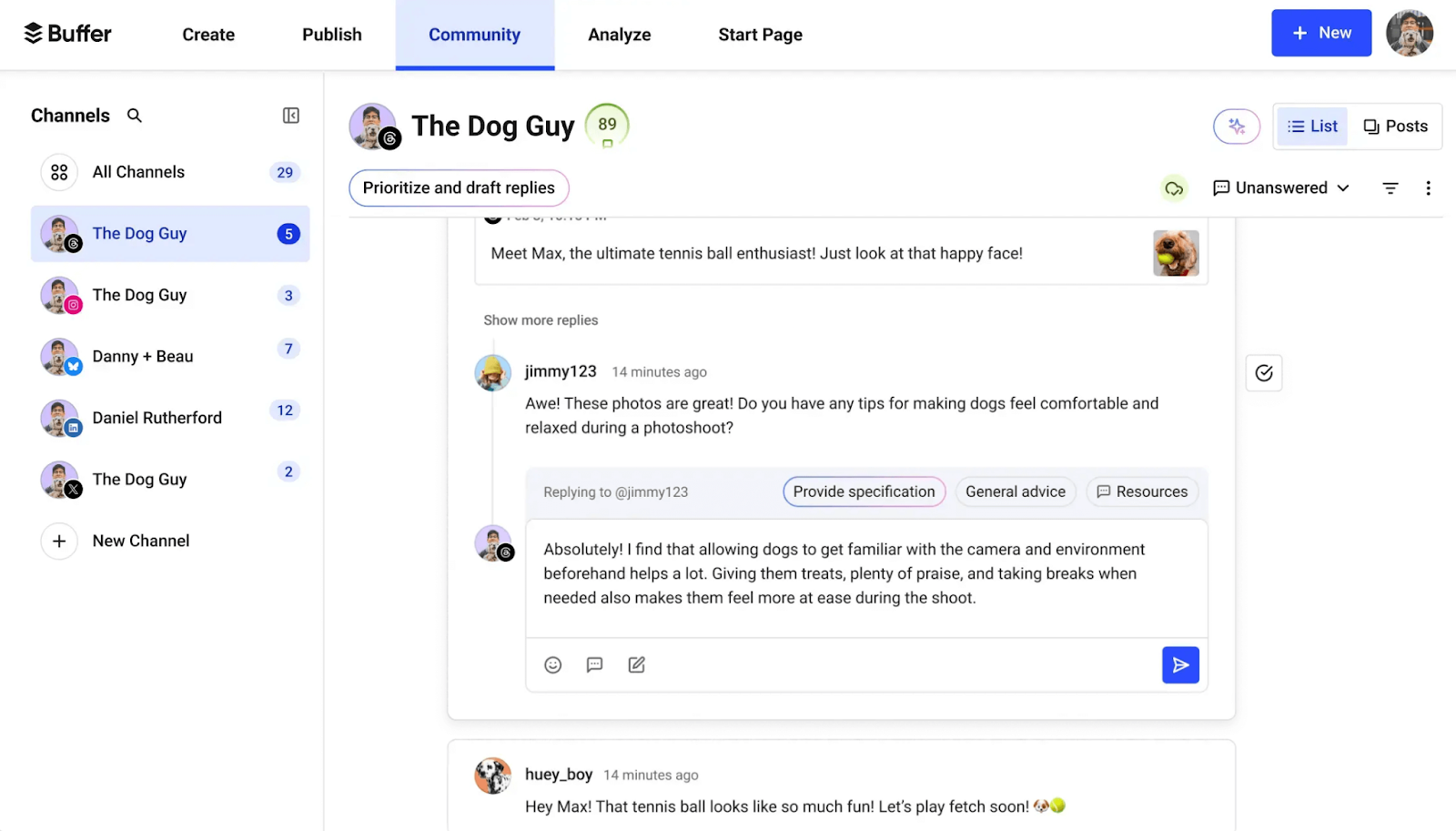
- A social media management platform with conversation management features. Such a tool can’t automate replies, but it can present you with a unified social media inbox for multiple accounts in one tab. For example, with Buffer's Community, you can see comments across different social media platforms in one tab and reply to them all at once. You can also save replies to answer FAQs and use AI assistance to reply faster.
Social media automation tools I’d recommend for this task: Buffer, Manychat.
7. Use templates for faster content creation
Templates have a wide variety of use cases. You can set up FAQs for customer service, as we discussed above, but you can also use them in the content creation process.
For example, in any graphic design platform (like Canva), you can use templates to build off the visuals for a social media post. Perhaps you can templatize a certain type of content format (say, customer testimonial posts). Or on Instagram, you can use Reel templates to quickly edit your video.

Think: What are some steps in your social media management process that are repeatable and can be streamlined? You’ll find plenty of areas that can benefit from a template (like building automated reports using a template).
Social media automation tools I’d recommend for this task: Canva.
8. Use social media collaboration tools to work with your team
If you work in a team, you often need inputs from your coworkers on a social media post or you might need to approve what content is going live. Instead of Slacking each other back and forth, use a social media collaboration software that can help you streamline the process.
In many social media management software (like Buffer) allows you to create content approval workflows and provide different levels of access for each specific team member. This means a creator can upload a post on the tool, a social media manager can approve it, and others can chime in with any notes or feedback they have.

Collaborating with a team can add up a lot of hours in your social media management if done manually. It’s best to automate the task so no message is missed and every step of your workflow is followed.
Social media automation tools I’d recommend for this task: Buffer.
9. Use social media monitoring software to track brand mentions
Social media monitoring involves tracking when someone mentions your brand in their post, Instagram Story, or comment. This helps catch feedback, register customer complaints, and spot user-generated content.
But you’d get a notification for every brand mention, so why bother using a social media automation tool for this task? Here’s why:
1. You can miss notifications, especially if you get an influx of them
2. You can’t track brand mentions unless you were tagged
Besides, you can use social media monitoring tools to track much more than just brand mentions — like your product name(s) or a competitor’s negative reviews.
Many social media management software like Buffer allow you to respond to comments from inside the tool so you don’t have to toggle tabs continuously.

Such automation tools are excellent to ensure you never leave an audience comment unanswered, regardless of whether you’re explicitly tagged. There are also some dedicated social media monitoring tools that help you combine social listening and monitoring in one software — you can track brand & product mentions alongside trends and news topics.
Social media automation tools I’d recommend for this task: Buffer, Mention.
10. Use influencer discovery software to find creators
If your social media efforts involve running an influencer marketing campaign, you can use influencer discovery tools to find creators who match your criteria quickly.
Most of these automation tools rely on filters to help you narrow down the kind of influencer you want. You can add filters related to different platforms — like follower count, reel views, engagement rate, etc. Many tools also support natural language AI search.
This alone saves you a lot of time you would’ve spent scouting through different platforms hunting for relevant influencers. Not only do these tools help you with managing your social media campaigns, some influencer marketing tools also allow you to run paid campaigns from social posts of influencers.
Social media automation tools I’d recommend for this task: Modash, SARAL.
The best social media automation tools you can use
In summary, here are the tools mentioned you can use for social media automation:
- Buffer for social media management in general: building a content calendar, scheduling posts, collaborating with teammates, responding to your audience, and more.
- Raindrop to save content ideas from the web.
- Exploding Topics or SparkToro for social listening.
- ChatGPT for AI assistance with captions, copy, or generating post ideas.
- Manychat for DM automation.
- Canva for visual templates.
- Mention for social media monitoring.
The above list can seem like a lot of tools to use simultaneously.
I’d recommend using a dedicated social media management tool like Buffer to automate most of your tedious tasks and slowly add more to your tech stack as and when needed.
Try to find tools that can help you complete multiple tasks so you don’t have the financial and the psychological burden of using too many social media automation platforms.
Don’t automate the human interaction
Social media marketing automation is wonderful for keeping your online presence intact, but it’s crucial to draw a clear line between streamlining tasks and outsourcing empathy. Automating relationship-building itself can backfire — one ill-placed “So cute!” bot comment on a serious post is enough to lose a follower for good.
For example, it’s great to use automation to answer a customer’s FAQs. But when queries need a personalized response, don’t use templates. Your audience can easily spot the automated response and they’ll feel like you’re not really listening to them.
Avoid automating whatever activities give you the human touch on social media. This might mean responding to comments, showing up on videos, and replying to DMs thoughtfully. In the end, remember that automation should help you serve your audience better instead of diminishing their experience.
from Buffer Resources https://ift.tt/VsRQqLZ
Social media managers are juggling multiple plates at once every day:
- brainstorming content ideas and creating text and video content
- scheduling posts and engaging on multiple social media accounts
- analyzing social media marketing performance and tweaking strategy based on data
- …And a lot more
Whew. It takes some elbow grease to keep the wheels spinning.
But what if you don’t have to do all that every single day? What if you could automate the mundane, repetitive tasks to social media tools and focus on your core jobs that actually move the needle toward your return-on-investment (ROI)?
Enter: Social media automation aka using software to automate repetitive tasks like scheduling posts, measuring performance, storing ideas, etc.
This article will share ten tasks you can automate in your social media management strategy to free up some headspace and clear up that to-do list.
Jump to a section:
- Why do you need social media automation?
- 1. Use digital bookmarks to save content ideas
- 2. Use social media listening tools to stay on top of niche trends
- 3. Use social media scheduling tools to publish your posts
- 4. Use social media analytics tool to analyze your performance
- 5. Use AI to refine your social media captions
- 6. Use chatbots to provide quick social media customer service
- 7. Use templates for faster content creation
- 8. Use social media collaboration tools to work with your team
- 9. Use social media monitoring software to track brand mentions
- 10. Use influencer discovery software to find creators
- The best social media automation tools you can use
Why do you need social media automation?
Social media automation has plenty of benefits. Here are the top three:
- Saving time: Take a simple task like social media scheduling. On the surface, it doesn’t sound like a lot of time saved. But when you think about publishing posts for multiple social media platforms over a long period of time, you get back a lot of hours.
- Less prone to human error: Social media managers are doing a lot, to put it mildly. It’s not unfair to assume you might forget to reply to a message or post on a new network because of the length of your to-do list. When you use a social media automation tool to manage your tasks, you shrink your margin of error significantly.
- More time for the fun (and more impactful) stuff: Relying on social media automation to do the repetitive tasks gives you more freedom and time to use your energy for the fun and more impactful tasks — like creating content and speaking to your target audience.
Automation puts the wind in the sails for your social media marketing efforts. Let's dig into the meaty stuff now and talk about the actual tasks on your never-ending to-do list you can outsource to a social media automation tool.
1. Use digital bookmarks to save content ideas
Imagine you saw an inspo post or piece of content that’d be perfect for your social media campaign. Then, life happened (Slack pings, laundry is done, someone has commented on your post…you get it). That A+ content idea or inspiration is now lost in the abyss.
Collecting and storing the right ideas when they strike you (or when you stumble on them) is one of the most important tasks in social media management. It’s also one of the easiest to get lost in the shuffle.
The solution:
- A digital bookmark tool to save all your web links. You integrate it in your browser and save any idea you like in one click. This not only ensures you never lose a beloved piece of content, but also gives you a collection of social media post ideas to tap into when you’re creating content.
- Buffer’s Create space to store any content ideas you get while walking the dog, showering, or doing the dishes. Can you use an ordinary Notes app for this social media task? Of course. But Buffer can become your one-stop social media management suite — meaning you can store ideas, create posts, engage with your audience, track your social media performance, and even create your link in bio all from one tool.
In a digital bookmark tool (like Raindrop) and in Buffer, you can organize your ideas into collections or group them using tags. This way, when you finally sit to batch-create your social media posts, you can find specific ideas for your various content pillars in a jiffy.
Social media automation tools I’d recommend for this task: Raindrop, Buffer.
2. Use social media listening tools to stay on top of niche trends
Social listening means observing what your audience is saying online and creating content around it. For instance, if you’re a haircare creator, you might notice trends around using rosemary water for hair growth and create a TikTok video on the topic.
But how do you know what’s hot and trending in your industry? Yes, there are several newsletters you could subscribe to. And sure, if you’re spending time online everyday and working in a specific niche, you’d know what’s up — to a certain extent. It’s still easy to miss a beat or two.
But there’s a better way to stay on top of trends than scrolling for multiple social networks every day for hours: Social listening tools. These automation tools help you uncover what your audience is searching for, what they are excited about, and related questions on a topic.
Many social media tools also contain trending topics with in-depth data on which terms & topics are trending — like Google Trends for social media.
⚡ Pro-tip: Many social networks also help you do this for their specific channel like Pinterest’s trend forecast and Instagram’s “Reel Trends” feature.
Keep an eye out for trends by spending time engaging with your audience on your social media accounts and scrolling for sometime. Match this data with your findings from social listening tools.
Social media automation tools I’d recommend for this task: Exploding Topics, SparkToro.
3. Use social media scheduling tools to publish your posts
Scheduling posts is the easiest social media task you can automate. Many social platforms, like Instagram and LinkedIn, natively provide you the option to schedule posts in advance. But I wouldn’t recommend automating natively within social channels. Here’s why:
- Lack of visual planning: Social media networks don’t offer a drag-and-drop content calendar feature, making it tough to see and adjust your schedule at a glance.
- One-stop scheduling is sloooow: If you’re a creator or social media manager, you’re likely maintaining a consistent social media presence across multiple social networks. Scheduling posts natively on each channel can be too time-consuming for your workflow. Using a scheduling tool, you can plan content for multiple platforms in one place, saving time and reducing context switching. This feature is especially helpful if you’re cross-posting the same social media post across multiple channels.
Now, the market’s saturated forehead-deep with social media publishing tools. Use the one that gets you the most bang for your buck. I recommend Buffer because:
- It’s easy to use — there’s no time wasted in a learning curve
- It lets you create custom posts for each network (if you wish to)
- It’s a leader in releasing integrations with new social media platforms
- It has a free tier and even its paid plans are quite affordable for small businesses
- It’s a full-fledged social media management tool so you can do multiple tasks with just one software
Whichever tool (or native feature) you choose, scheduling posts is the easiest social media task to automate. And it’s beginner-friendly because it doesn’t require you to relinquish a lot of control. So, if you’re just beginning with your social media automation strategy, begin by automating publishing your posts in advance.
Social media automation tools I’d recommend for this task: Buffer.
4. Use social media analytics tool to analyze your performance
Analyzing your social media metrics plays a big role in improving your strategy. You want to know how many likes, shares, comments, and saves your social media posts received. Robust analytics on every post can help you find patterns and recognize your best-performing topics, what your audience resonates the most with, etc.
Collecting and dissecting your performance numbers natively is a tedious task. You have to note the performance data for posts on every social media account you have and then find patterns across multiple platforms.
Social media analytics tools can automate collecting and analyzing all your performance metrics so you don’t have to do the math yourself. You’ll still need to tie back how your social media efforts contribute to your larger goals, but you can easily outsource the “gather how my posts are doing” job.
In Buffer, you can set a timeframe and not only see the basic metrics like impressions, likes, yada yada, but also get answers to questions that actually matter — like, “Which is the best type of post for this social media channel?” or “At what time should I post to get the most social media engagement?” and even “How often should I post?”
All of these answers are tailored to you and your social media accounts. The more you use Buffer, the more data you’ll have to make calculated insights into what’s working the best in your social media strategy.
Gathering insights from the analysis to optimize the social strategy is your wheelhouse. But gathering those metrics? Delegate that to a software.
Social media automation tools I’d recommend for this task: Buffer.
5. Use AI to refine your social media captions
AI is a big part of work today everywhere and social media management is no exception. You can use AI assistants to:
- Populate popular hashtags in a category
- Write the first draft of your social media caption
- Refine your existing copy to be more clear and concise
- Generate post ideas by giving a simple prompt of your niche
- Repurpose posts from one social media account for multiple platforms
The likes of ChatGPT are good for this, but many social media management platforms (like Buffer) are also AI-powered. Buffer, for example, comes with an in-built assistant so you can do all of the above tasks without switching a single tab.
Many AI tools have excellent capabilities, but remember you can’t automate the task completely to them. Add your human voice and niche expertise into the mix. Read more about how we use AI at Buffer to strike the balance between automation and human.
Social media automation tools I’d recommend for this task: ChatGPT, Buffer.
6. Use chatbots to provide quick social media customer service
If you’ve used social media for customer service for even one day, you know the need for a chatbot that can quickly reply to customers’ comments and DMs, redirect them to the right help article, and sell products.
Instagram has a native feature to help you set up frequently asked questions (FAQs) in your chat box. When someone starts a chat with you, they will first see the commonly asked questions and can tap for an automated reply (which seems real-time).
But it’s not flexible or adaptable for various use cases. For a better social media engagement strategy, you can use either:
- A DM automation tool that automatically replies to customers’ comments or DMs with the right link or content. You know those “comment for link/access” types of social media posts — you can create them using a DM automation tool.
- A social media management platform with conversation management features. Such a tool can’t automate replies, but it can present you with a unified social media inbox for multiple accounts in one tab. For example, with Buffer's Community, you can see comments across different social media platforms in one tab and reply to them all at once. You can also save replies to answer FAQs and use AI assistance to reply faster.
Social media automation tools I’d recommend for this task: Buffer, Manychat.
7. Use templates for faster content creation
Templates have a wide variety of use cases. You can set up FAQs for customer service, as we discussed above, but you can also use them in the content creation process.
For example, in any graphic design platform (like Canva), you can use templates to build off the visuals for a social media post. Perhaps you can templatize a certain type of content format (say, customer testimonial posts). Or on Instagram, you can use Reel templates to quickly edit your video.
Think: What are some steps in your social media management process that are repeatable and can be streamlined? You’ll find plenty of areas that can benefit from a template (like building automated reports using a template).
Social media automation tools I’d recommend for this task: Canva.
8. Use social media collaboration tools to work with your team
If you work in a team, you often need inputs from your coworkers on a social media post or you might need to approve what content is going live. Instead of Slacking each other back and forth, use a social media collaboration software that can help you streamline the process.
In many social media management software (like Buffer) allows you to create content approval workflows and provide different levels of access for each specific team member. This means a creator can upload a post on the tool, a social media manager can approve it, and others can chime in with any notes or feedback they have.
Collaborating with a team can add up a lot of hours in your social media management if done manually. It’s best to automate the task so no message is missed and every step of your workflow is followed.
Social media automation tools I’d recommend for this task: Buffer.
9. Use social media monitoring software to track brand mentions
Social media monitoring involves tracking when someone mentions your brand in their post, Instagram Story, or comment. This helps catch feedback, register customer complaints, and spot user-generated content.
But you’d get a notification for every brand mention, so why bother using a social media automation tool for this task? Here’s why:
1. You can miss notifications, especially if you get an influx of them
2. You can’t track brand mentions unless you were tagged
Besides, you can use social media monitoring tools to track much more than just brand mentions — like your product name(s) or a competitor’s negative reviews.
Many social media management software like Buffer allow you to respond to comments from inside the tool so you don’t have to toggle tabs continuously.
Such automation tools are excellent to ensure you never leave an audience comment unanswered, regardless of whether you’re explicitly tagged. There are also some dedicated social media monitoring tools that help you combine social listening and monitoring in one software — you can track brand & product mentions alongside trends and news topics.
Social media automation tools I’d recommend for this task: Buffer, Mention.
10. Use influencer discovery software to find creators
If your social media efforts involve running an influencer marketing campaign, you can use influencer discovery tools to find creators who match your criteria quickly.
Most of these automation tools rely on filters to help you narrow down the kind of influencer you want. You can add filters related to different platforms — like follower count, reel views, engagement rate, etc. Many tools also support natural language AI search.
This alone saves you a lot of time you would’ve spent scouting through different platforms hunting for relevant influencers. Not only do these tools help you with managing your social media campaigns, some influencer marketing tools also allow you to run paid campaigns from social posts of influencers.
Social media automation tools I’d recommend for this task: Modash, SARAL.
The best social media automation tools you can use
In summary, here are the tools mentioned you can use for social media automation:
- Buffer for social media management in general: building a content calendar, scheduling posts, collaborating with teammates, responding to your audience, and more.
- Raindrop to save content ideas from the web.
- Exploding Topics or SparkToro for social listening.
- ChatGPT for AI assistance with captions, copy, or generating post ideas.
- Manychat for DM automation.
- Canva for visual templates.
- Mention for social media monitoring.
The above list can seem like a lot of tools to use simultaneously.
I’d recommend using a dedicated social media management tool like Buffer to automate most of your tedious tasks and slowly add more to your tech stack as and when needed.
Try to find tools that can help you complete multiple tasks so you don’t have the financial and the psychological burden of using too many social media automation platforms.
Don’t automate the human interaction
Social media marketing automation is wonderful for keeping your online presence intact, but it’s crucial to draw a clear line between streamlining tasks and outsourcing empathy. Automating relationship-building itself can backfire — one ill-placed “So cute!” bot comment on a serious post is enough to lose a follower for good.
For example, it’s great to use automation to answer a customer’s FAQs. But when queries need a personalized response, don’t use templates. Your audience can easily spot the automated response and they’ll feel like you’re not really listening to them.
Avoid automating whatever activities give you the human touch on social media. This might mean responding to comments, showing up on videos, and replying to DMs thoughtfully. In the end, remember that automation should help you serve your audience better instead of diminishing their experience.
Comments
Post a Comment