
Managing multiple social media accounts can feel like a lot — especially when you're doing it solo. But with the right approach, it doesn't have to be overwhelming.
If you're a creator or small business owner trying to stay active across multiple social media networks, you're probably wondering how to make it all work without burning out. This article shares seven strategies you can use (with software recommendations in between) to manage multiple social media accounts effectively.
Quick summary: how to manage multiple accounts
- Use templates: Create repeatable formats in Canva to reduce design time and maintain brand consistency.
- Repurpose and crosspost: Share high-performing content across similar platforms like Instagram Reels, TikTok, and YouTube Shorts.
- Automate workflows: Use tools to schedule posts, automate analytics, and utilize AI for caption refinement.
- Centralize management: Use a platform like Buffer to manage engagement and scheduling from a single dashboard.
- Scale intentionally: Master one platform before expanding to others to avoid creator burnout.
Jump to a section:
- 1. Create templates for repeatable post formats
- 2. Mix content curation into your social media calendar
- 3. Crosspost and repurpose your existing content
- 4. Automate routine tasks in your social media workflow
- 5. Create a solid social media strategy and content calendar
- 6. Use a social media management tool
- 7. Join new social media platforms slowly and with intention
- Manage multiple social media accounts with ease
- FAQ about managing multiple social media accounts
- More social media marketing resources
1. Create templates for repeatable post formats
Here's something that's helped a lot of social media managers and creators: creating templates for post formats you'll use more than once.
Let’s say you post a ‘social proof post’ every Tuesday. Create an easily-editable template on Canva (or any other software of your choice) that you can edit in a jiffy.
Templates help you manage multiple accounts more easily, and they also make your content more recognizable to your audience over time.
Plus, templates take some of that pressure off. You don't have to come up with something completely new every single day. You have a repeatable post format you can lean into that you already know performs well.
For example: Brand designer and content creator, Sandra K., often shares similar FRIENDS-themed carousel designs on her Instagram account.

Imagine how quickly you'd be able to create similar posts. All you have to do is swap the content and adjust the graphics a little bit if needed.
Everything else is already done. Managing multiple accounts suddenly becomes much more efficient when you have templates in your back pocket.
2. Mix content curation into your social media calendar
Ever seen those posts where someone rounds up helpful content from other creators around a specific topic? It has commonalities — like the collection is advice around the same topic or top posts from the same thought leader.
That is content curation. It’s when you organize information — not necessarily created by you — in a digestible way for your audience.
Curated content is easier to create than starting from scratch, which is helpful when you're managing multiple accounts. But it's also valuable for your audience — you're doing the work of finding and organizing helpful information they might have missed (and saving them time on social media post ideas, too).
Mix curated content with original content. It will allow you to not only manage multiple social media accounts and post everywhere consistently, but also create a content series that your audience will look forward to.
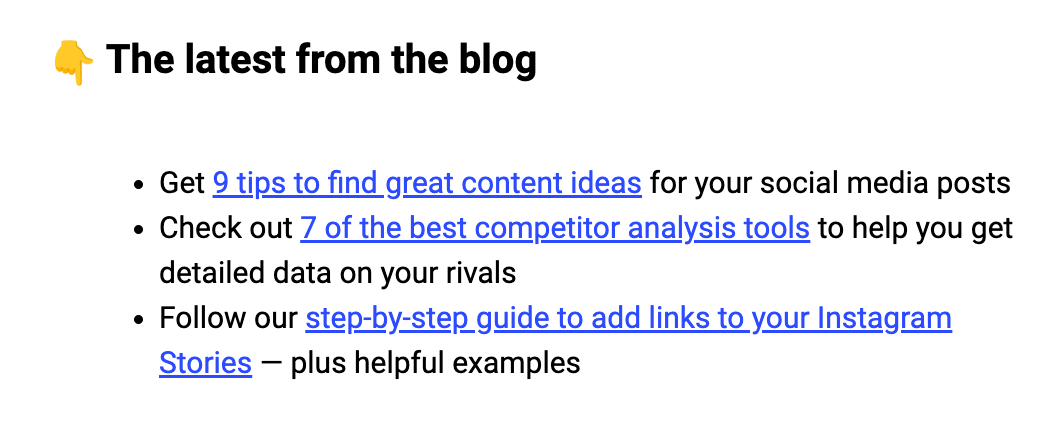
For example, at Buffer, we curate the top content from our marketing efforts and social media world in our weekly newsletter.
3. Crosspost and repurpose your existing content
Crossposting is when you post the same piece of content across multiple social media platforms. For example, Laura Whaley posted the same video across different platforms — on Instagram, TikTok, and YouTube Shorts.
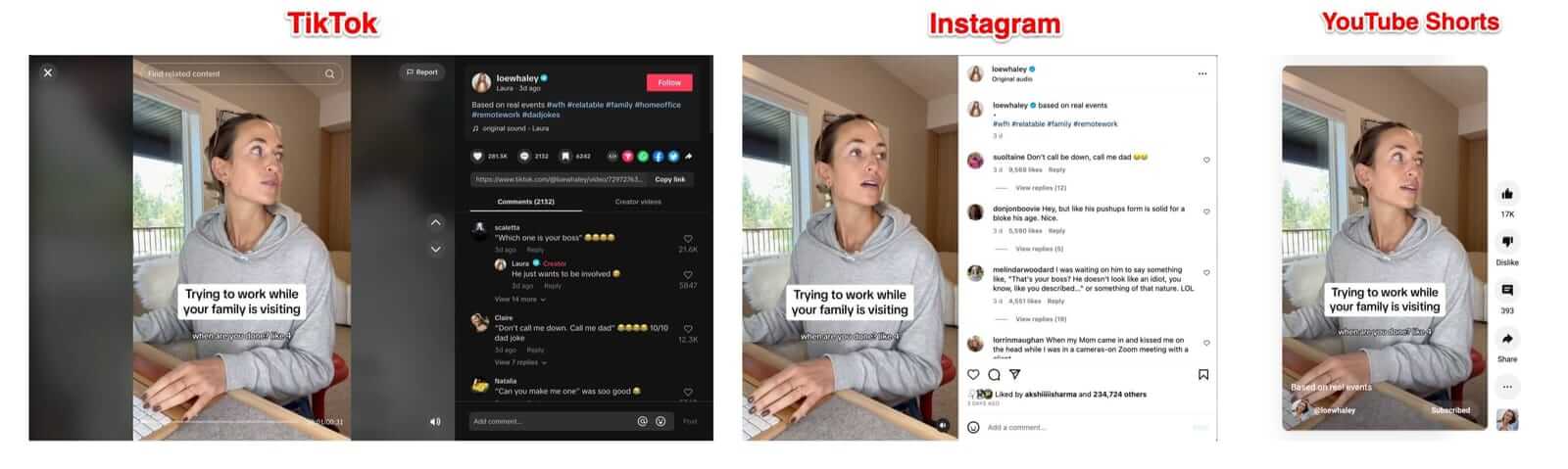
You can easily do this for social media platforms that support the same type of content. For example, Instagram Reels, TikTok videos, and YouTube Shorts all love short-form video content.
Suppose you’re managing multiple social media accounts — you started with Instagram and are now adding TikTok. You can cross-post the Instagram Reels that performed well on TikTok without any edits.
This is the benefit of having tested the waters with one network at a time — you already have a content library to build on for other networks.
Content repurposing is when you use your existing content to create new content. For example, we repurposed our long-form article about brands using Threads well into an Instagram carousel.
Repurposing allows you to create content for various social media posts from just one piece of content. You don’t have to start from scratch every time, which is a huge win for anyone managing multiple social media accounts. You can turn your:
- Long-form written content into Instagram Carousels, X or Bluesky threads, or LinkedIn posts
- YouTube’s long-form videos into short-form videos for Instagram and TikTok
- Research reports into Instagram and Pinterest infographics
- … And so much more
4. Automate routine tasks in your social media workflow
Social media automation means letting software handle the repetitive tasks — like scheduling posts — so you can focus on the creative and strategic work. Scheduling posts using social media tools is a part of automation. There are several other tasks you could automate to make managing multiple accounts easier:
- Use social media management software to schedule posts for all your accounts
- Use social media analytics tools to measure your performance
- Use chatbots to answer the most common customer queries
- Use AI tools to refine your social media captions
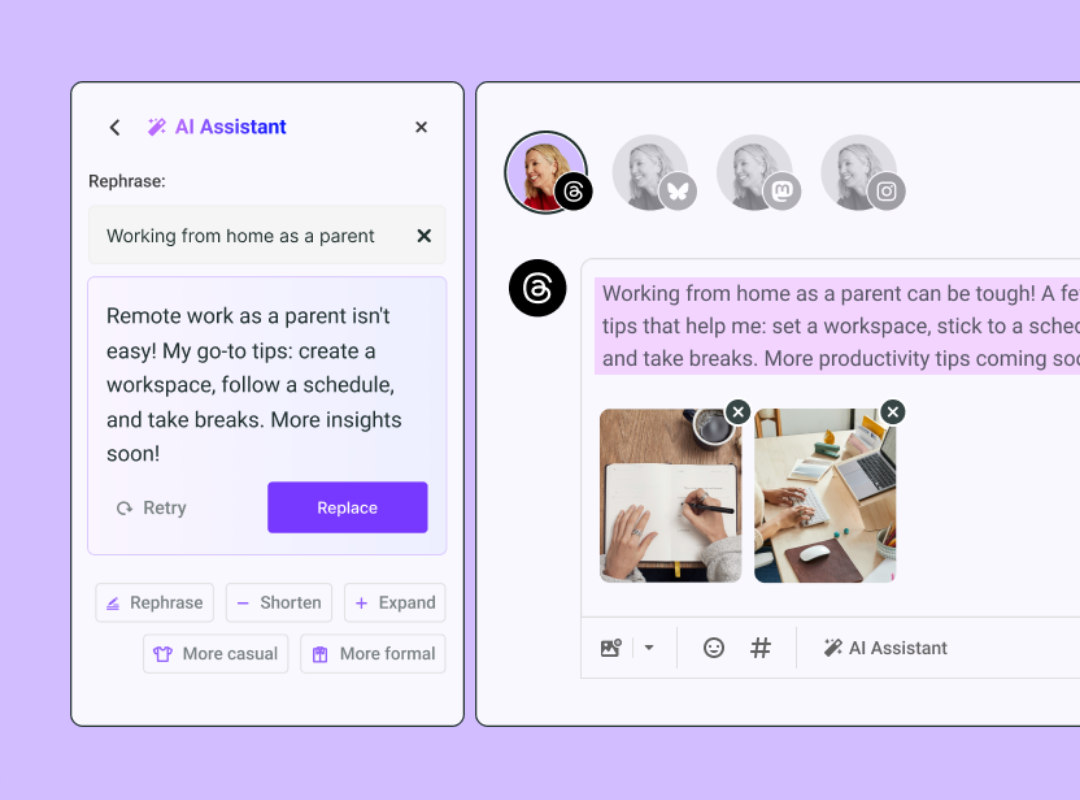
An example: Using Buffer’s AI assistant, you can change the tone of your social media captions to be more formal, casual, funny, etc.
Start by listing out all the tasks involved in managing your accounts — from finding content ideas to creating posts for different platforms and audiences. Then, try to find tools that can help you automate these tasks or at least make you more efficient in completing them.
5. Create a solid social media strategy and content calendar
A solid social media strategy is the foundation that guides your content calendar and helps you stay focused.
Having a social media strategy means you know your:
- Target audience and their pain points
- Various social media networks your audience is active in
- Social media goals and how they fit into your business goals
- The social media content you can create to meet your audience’s needs
Your social media strategy will help you create an actionable social media content calendar. It enables you to fit your content creation into a timeline and maintain a consistent publishing schedule. You know what post should go live on which social network at what time and why — the crux of managing multiple social media accounts efficiently.
6. Use a social media management tool
One of the most helpful ways to manage multiple accounts is by using a social media management tool. It brings everything together in one place, which makes the whole process feel a lot more manageable. Most social media management tools help you:
- Add multiple accounts from multiple social media platforms
- Schedule social media posts in advance from your content calendar
- Manage the engagement on all your accounts — including comments, direct messages (DMs), etc.
- Have analytics tools and reporting tools built-in to measure the impact of your social media content and let it guide the refinement of your strategy
Social media management tools are popular with teams and agencies, but they're just as valuable for solo creators and small business owners.
If you're looking for something affordable (or free to start), Buffer lets you connect up to three channels at no cost and schedule ten posts per month. It's designed to be useful without overwhelming you with features you don't need.
You can connect up to three social media channels at no cost and schedule ten posts per month across social media networks. Even when you upgrade, the cost is just $6/month/channel for scheduling unlimited posts.
Plus: You get access to other cool features like an AI assistant, a landing page builder, and an Ideas board.
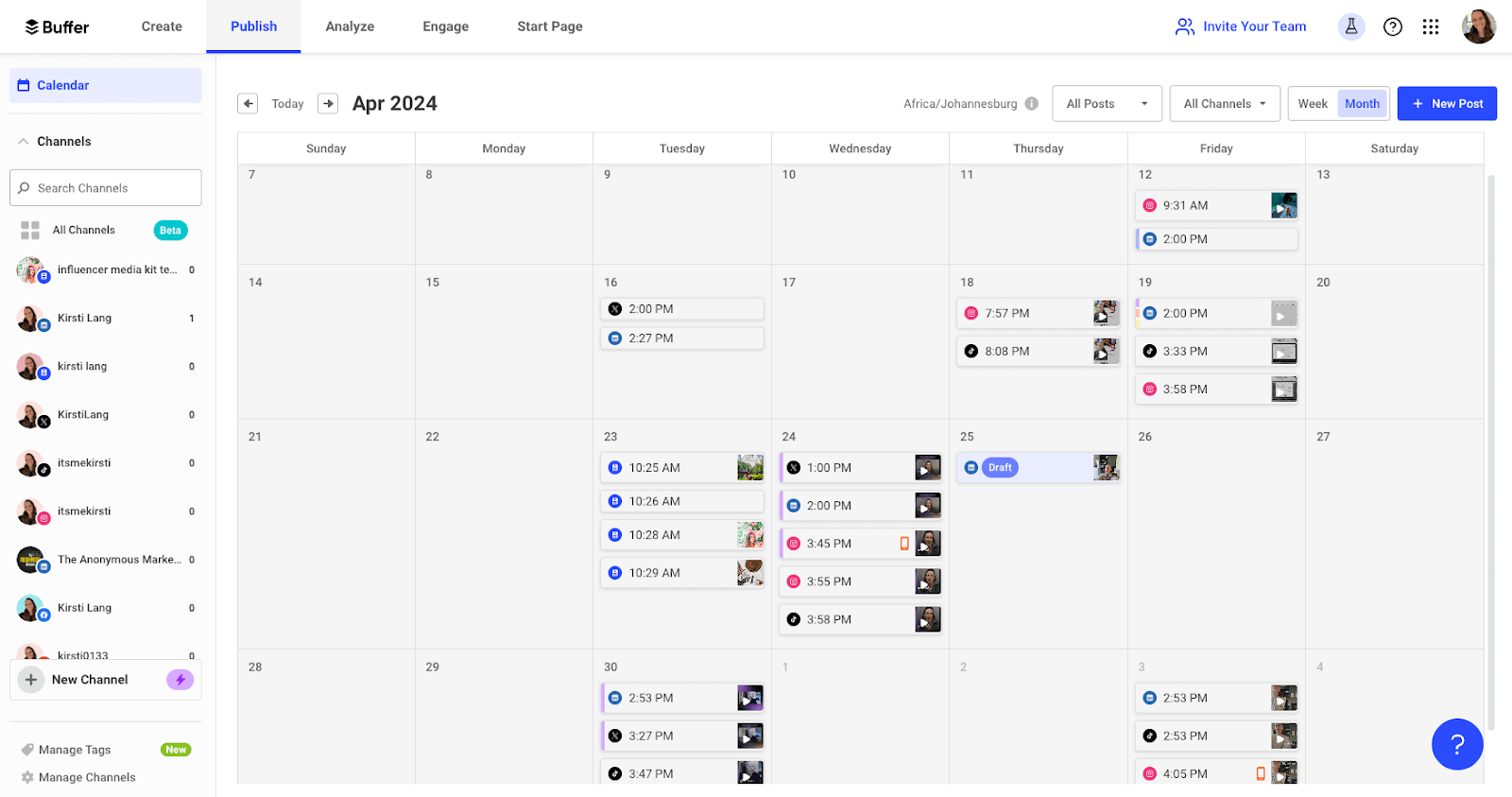
Buffer is built specifically for creators and small business owners who need something straightforward and affordable. You can try it for free to see if it works for your workflow.
Using a social media management tool is the most straightforward way to manage multiple social media accounts without missing a beat. As soon as you have a social media strategy, shortlist your ideal social media management software. Choose something that can scale with your needs and supports all the networks you plan to be on.
7. Join new social media platforms slowly and with intention
Before jumping into multiple platforms at once, it's worth thinking about which ones make the most sense for your goals and audience. It’s tempting to be everywhere all at once. Starting with too many platforms at once can feel overwhelming pretty quickly. A more sustainable approach is to add new platforms gradually to avoid creator burnout. If you’re planning to handle multiple social accounts right from day one, rethink your approach.
First, narrow down the social media sites your audience uses based on your business type. As a general guideline:
Different audiences use different platforms to discover new products and services. Don’t assume you know this without doing upfront research. Ask your existing audience how they found you and which social network they browse to learn about new products in your niche.
It’s also important to note that your audience might be on multiple networks, but they aren’t always in the buying mindset on each social media site.
For example, if you sell shampoos, your target audience might still scroll LinkedIn. But they aren’t there to learn about your product. They'll scroll away if they see your ad campaigns or organic social content on LinkedIn. But on TikTok, they are in the buying mindset toward shampoos and might visit your website and make a purchase.
Let’s say you learned that your audience discovers products or services like yours on Instagram, TikTok, and Pinterest. Instead of starting multiple social media accounts on all these networks simultaneously, tread slowly.
For example, you start by creating content on Instagram. In a few months, you learn the ropes of what works best on this site and get comfortable creating and maintaining an editorial calendar for Instagram. Now, introduce TikTok and go through the same process. Going slow and steady will help you in three ways:
- You won’t overwhelm yourself trying to manage multiple social media accounts all at once.
- You can transfer the general learnings of one social media network to another to avoid repeating the same mistakes (and growing faster).
- You will already have a backlog of content to repurpose and/or repost to a new social media account on a new network.
To manage multiple social media accounts without losing your mind, you need to add new platforms slowly and intentionally. No one says you need to jump into managing multiple social media accounts at the same time. There are only benefits to moving in an unhurried manner and only risks in moving too fast.
Manage multiple social media accounts with ease
Managing multiple social media accounts takes real work. You not only have to create content for multiple social media accounts but also learn their algorithms, social media users' preferences, and engagement strategies. This isn’t a walk in the park, even for a dedicated social media team.
If you're managing multiple accounts while wearing all the other hats that come with being a creator or solo marketer, you're already doing something that takes real skill and effort.
Then, try to pick out at least three tactics from above that could help you right now. If you already have social media platforms in place, for instance, then perhaps you need more strategies to help with content creation — like building templates and curating content.
Managing multiple accounts does get easier with practice. You'll find your rhythm, discover which tools work best for you, and develop systems that make the whole process feel more natural.
FAQ about managing multiple social media accounts
What is the best way to manage multiple social media accounts?
Start with a plan, then use the right tools. First, choose the social networks your audience already loves. Next, build a simple content calendar so you always know what to post and when. Repurpose high-performing posts across platforms to save time. Finally, use a social media management tool—Buffer is a good option—to schedule content, reply to comments, and review analytics from one dashboard.
What is the best tool to manage multiple social media accounts?
The best tool is one that lets you schedule posts, respond to comments, and track performance from a single dashboard without adding complexity. Buffer is popular with creators and small businesses because it’s easy to use, affordable, and designed to scale as your needs grow.
Is it OK to post the same content on multiple platforms?
Please do, especially on platforms that support similar formats. For example, crossposting short-form videos between Instagram, TikTok, and YouTube Shorts can save time and extend the reach of your best content.
What is the difference between crossposting and repurposing content?
Crossposting means sharing the same piece of content across multiple platforms with little or no change. Repurposing goes a step further by adapting one piece of content into different formats, like turning a blog post into a carousel or a long-form video into short clips.
Do I need a content calendar to manage multiple accounts?
A content calendar makes managing multiple accounts significantly easier. It helps you plan what to post, where it will go, and why it matters.
How can I schedule posts to several social networks at once?
A social media management platform does the heavy lifting. Connect your accounts inside Buffer, add your posts to the shared calendar, pick the publish times, and hit schedule. Buffer sends each post to the right network automatically, saving you from copying and pasting in every app.
More social media marketing resources
- How Often to Post on Social Media: A Data-Backed Guide
- Social Media Automation: 10 Tasks You Can Automate (+ Tools to Help)
- 9+ Social Media, Marketing, and Creator Economy Conferences to Attend
- Types of Social Media Content: 30+ Ideas for Your Next Post (With Examples)
- 40 Free High-Quality Social Media Icon Sets For Your Website
| Business type | Recommended platform |
|---|---|
| Direct-to-Consumer (D2C) | TikTok, Instagram, Pinterest |
| Business-to-Business (B2B) | LinkedIn, X (Twitter), Bluesky |
from Buffer Resources https://ift.tt/kdt10hg
Managing multiple social media accounts can feel like a lot — especially when you're doing it solo. But with the right approach, it doesn't have to be overwhelming.
If you're a creator or small business owner trying to stay active across multiple social media networks, you're probably wondering how to make it all work without burning out. This article shares seven strategies you can use (with software recommendations in between) to manage multiple social media accounts effectively.
Quick summary: how to manage multiple accounts
- Use templates: Create repeatable formats in Canva to reduce design time and maintain brand consistency.
- Repurpose and crosspost: Share high-performing content across similar platforms like Instagram Reels, TikTok, and YouTube Shorts.
- Automate workflows: Use tools to schedule posts, automate analytics, and utilize AI for caption refinement.
- Centralize management: Use a platform like Buffer to manage engagement and scheduling from a single dashboard.
- Scale intentionally: Master one platform before expanding to others to avoid creator burnout.
Jump to a section:
- 1. Create templates for repeatable post formats
- 2. Mix content curation into your social media calendar
- 3. Crosspost and repurpose your existing content
- 4. Automate routine tasks in your social media workflow
- 5. Create a solid social media strategy and content calendar
- 6. Use a social media management tool
- 7. Join new social media platforms slowly and with intention
- Manage multiple social media accounts with ease
- FAQ about managing multiple social media accounts
- More social media marketing resources
1. Create templates for repeatable post formats
Here's something that's helped a lot of social media managers and creators: creating templates for post formats you'll use more than once.
Let’s say you post a ‘social proof post’ every Tuesday. Create an easily-editable template on Canva (or any other software of your choice) that you can edit in a jiffy.
Templates help you manage multiple accounts more easily, and they also make your content more recognizable to your audience over time.
Plus, templates take some of that pressure off. You don't have to come up with something completely new every single day. You have a repeatable post format you can lean into that you already know performs well.
For example: Brand designer and content creator, Sandra K., often shares similar FRIENDS-themed carousel designs on her Instagram account.
Imagine how quickly you'd be able to create similar posts. All you have to do is swap the content and adjust the graphics a little bit if needed.
Everything else is already done. Managing multiple accounts suddenly becomes much more efficient when you have templates in your back pocket.
2. Mix content curation into your social media calendar
Ever seen those posts where someone rounds up helpful content from other creators around a specific topic? It has commonalities — like the collection is advice around the same topic or top posts from the same thought leader.
That is content curation. It’s when you organize information — not necessarily created by you — in a digestible way for your audience.
Curated content is easier to create than starting from scratch, which is helpful when you're managing multiple accounts. But it's also valuable for your audience — you're doing the work of finding and organizing helpful information they might have missed (and saving them time on social media post ideas, too).
Mix curated content with original content. It will allow you to not only manage multiple social media accounts and post everywhere consistently, but also create a content series that your audience will look forward to.
For example, at Buffer, we curate the top content from our marketing efforts and social media world in our weekly newsletter.
3. Crosspost and repurpose your existing content
Crossposting is when you post the same piece of content across multiple social media platforms. For example, Laura Whaley posted the same video across different platforms — on Instagram, TikTok, and YouTube Shorts.
You can easily do this for social media platforms that support the same type of content. For example, Instagram Reels, TikTok videos, and YouTube Shorts all love short-form video content.
Suppose you’re managing multiple social media accounts — you started with Instagram and are now adding TikTok. You can cross-post the Instagram Reels that performed well on TikTok without any edits.
This is the benefit of having tested the waters with one network at a time — you already have a content library to build on for other networks.
Content repurposing is when you use your existing content to create new content. For example, we repurposed our long-form article about brands using Threads well into an Instagram carousel.
Repurposing allows you to create content for various social media posts from just one piece of content. You don’t have to start from scratch every time, which is a huge win for anyone managing multiple social media accounts. You can turn your:
- Long-form written content into Instagram Carousels, X or Bluesky threads, or LinkedIn posts
- YouTube’s long-form videos into short-form videos for Instagram and TikTok
- Research reports into Instagram and Pinterest infographics
- … And so much more
4. Automate routine tasks in your social media workflow
Social media automation means letting software handle the repetitive tasks — like scheduling posts — so you can focus on the creative and strategic work. Scheduling posts using social media tools is a part of automation. There are several other tasks you could automate to make managing multiple accounts easier:
- Use social media management software to schedule posts for all your accounts
- Use social media analytics tools to measure your performance
- Use chatbots to answer the most common customer queries
- Use AI tools to refine your social media captions
An example: Using Buffer’s AI assistant, you can change the tone of your social media captions to be more formal, casual, funny, etc.
Start by listing out all the tasks involved in managing your accounts — from finding content ideas to creating posts for different platforms and audiences. Then, try to find tools that can help you automate these tasks or at least make you more efficient in completing them.
5. Create a solid social media strategy and content calendar
A solid social media strategy is the foundation that guides your content calendar and helps you stay focused.
Having a social media strategy means you know your:
- Target audience and their pain points
- Various social media networks your audience is active in
- Social media goals and how they fit into your business goals
- The social media content you can create to meet your audience’s needs
Your social media strategy will help you create an actionable social media content calendar. It enables you to fit your content creation into a timeline and maintain a consistent publishing schedule. You know what post should go live on which social network at what time and why — the crux of managing multiple social media accounts efficiently.
6. Use a social media management tool
One of the most helpful ways to manage multiple accounts is by using a social media management tool. It brings everything together in one place, which makes the whole process feel a lot more manageable. Most social media management tools help you:
- Add multiple accounts from multiple social media platforms
- Schedule social media posts in advance from your content calendar
- Manage the engagement on all your accounts — including comments, direct messages (DMs), etc.
- Have analytics tools and reporting tools built-in to measure the impact of your social media content and let it guide the refinement of your strategy
Social media management tools are popular with teams and agencies, but they're just as valuable for solo creators and small business owners.
If you're looking for something affordable (or free to start), Buffer lets you connect up to three channels at no cost and schedule ten posts per month. It's designed to be useful without overwhelming you with features you don't need.
You can connect up to three social media channels at no cost and schedule ten posts per month across social media networks. Even when you upgrade, the cost is just $6/month/channel for scheduling unlimited posts.
Plus: You get access to other cool features like an AI assistant, a landing page builder, and an Ideas board.
Buffer is built specifically for creators and small business owners who need something straightforward and affordable. You can try it for free to see if it works for your workflow.
Using a social media management tool is the most straightforward way to manage multiple social media accounts without missing a beat. As soon as you have a social media strategy, shortlist your ideal social media management software. Choose something that can scale with your needs and supports all the networks you plan to be on.
7. Join new social media platforms slowly and with intention
Before jumping into multiple platforms at once, it's worth thinking about which ones make the most sense for your goals and audience. It’s tempting to be everywhere all at once. Starting with too many platforms at once can feel overwhelming pretty quickly. A more sustainable approach is to add new platforms gradually to avoid creator burnout. If you’re planning to handle multiple social accounts right from day one, rethink your approach.
First, narrow down the social media sites your audience uses based on your business type. As a general guideline:
Different audiences use different platforms to discover new products and services. Don’t assume you know this without doing upfront research. Ask your existing audience how they found you and which social network they browse to learn about new products in your niche.
It’s also important to note that your audience might be on multiple networks, but they aren’t always in the buying mindset on each social media site.
For example, if you sell shampoos, your target audience might still scroll LinkedIn. But they aren’t there to learn about your product. They'll scroll away if they see your ad campaigns or organic social content on LinkedIn. But on TikTok, they are in the buying mindset toward shampoos and might visit your website and make a purchase.
Let’s say you learned that your audience discovers products or services like yours on Instagram, TikTok, and Pinterest. Instead of starting multiple social media accounts on all these networks simultaneously, tread slowly.
For example, you start by creating content on Instagram. In a few months, you learn the ropes of what works best on this site and get comfortable creating and maintaining an editorial calendar for Instagram. Now, introduce TikTok and go through the same process. Going slow and steady will help you in three ways:
- You won’t overwhelm yourself trying to manage multiple social media accounts all at once.
- You can transfer the general learnings of one social media network to another to avoid repeating the same mistakes (and growing faster).
- You will already have a backlog of content to repurpose and/or repost to a new social media account on a new network.
To manage multiple social media accounts without losing your mind, you need to add new platforms slowly and intentionally. No one says you need to jump into managing multiple social media accounts at the same time. There are only benefits to moving in an unhurried manner and only risks in moving too fast.
Manage multiple social media accounts with ease
Managing multiple social media accounts takes real work. You not only have to create content for multiple social media accounts but also learn their algorithms, social media users' preferences, and engagement strategies. This isn’t a walk in the park, even for a dedicated social media team.
If you're managing multiple accounts while wearing all the other hats that come with being a creator or solo marketer, you're already doing something that takes real skill and effort.
Then, try to pick out at least three tactics from above that could help you right now. If you already have social media platforms in place, for instance, then perhaps you need more strategies to help with content creation — like building templates and curating content.
Managing multiple accounts does get easier with practice. You'll find your rhythm, discover which tools work best for you, and develop systems that make the whole process feel more natural.
FAQ about managing multiple social media accounts
What is the best way to manage multiple social media accounts?
Start with a plan, then use the right tools. First, choose the social networks your audience already loves. Next, build a simple content calendar so you always know what to post and when. Repurpose high-performing posts across platforms to save time. Finally, use a social media management tool—Buffer is a good option—to schedule content, reply to comments, and review analytics from one dashboard.
What is the best tool to manage multiple social media accounts?
The best tool is one that lets you schedule posts, respond to comments, and track performance from a single dashboard without adding complexity. Buffer is popular with creators and small businesses because it’s easy to use, affordable, and designed to scale as your needs grow.
Is it OK to post the same content on multiple platforms?
Please do, especially on platforms that support similar formats. For example, crossposting short-form videos between Instagram, TikTok, and YouTube Shorts can save time and extend the reach of your best content.
What is the difference between crossposting and repurposing content?
Crossposting means sharing the same piece of content across multiple platforms with little or no change. Repurposing goes a step further by adapting one piece of content into different formats, like turning a blog post into a carousel or a long-form video into short clips.
Do I need a content calendar to manage multiple accounts?
A content calendar makes managing multiple accounts significantly easier. It helps you plan what to post, where it will go, and why it matters.
How can I schedule posts to several social networks at once?
A social media management platform does the heavy lifting. Connect your accounts inside Buffer, add your posts to the shared calendar, pick the publish times, and hit schedule. Buffer sends each post to the right network automatically, saving you from copying and pasting in every app.
More social media marketing resources
- How Often to Post on Social Media: A Data-Backed Guide
- Social Media Automation: 10 Tasks You Can Automate (+ Tools to Help)
- 9+ Social Media, Marketing, and Creator Economy Conferences to Attend
- Types of Social Media Content: 30+ Ideas for Your Next Post (With Examples)
- 40 Free High-Quality Social Media Icon Sets For Your Website
| Business type | Recommended platform |
|---|---|
| Direct-to-Consumer (D2C) | TikTok, Instagram, Pinterest |
| Business-to-Business (B2B) | LinkedIn, X (Twitter), Bluesky |
Comments
Post a Comment