If you’re comparing social media management tools, Buffer and Metricool will probably both end up on your list — they certainly did for me! They’re in a similar price range, they cover similar platforms, and they show up in a lot of the same “best of” roundups.
They also have strengths in different areas, as I discovered upon extensive testing. 🤓 Which one works better for you comes down to how you work.
Buffer serves creators, solopreneurs, small businesses, agencies, and growing teams that want a simple, flexible publishing workflow and an easy way to stay on top of comments.
Metricool is built for marketers and agencies who want to track competitors and need detailed reporting to share with clients or stakeholders.
In this guide, I’ll compare both platforms so you can decide which is the right one for you.
Jump to a section:
Key takeaways
- Buffer offers a free-forever plan with 3 social channels, 10 scheduled posts per channel (refillable anytime), API access on every plan, and basic analytics. Metricool's Free plan covers 1 brand with a maximum of 20 published posts a month, although LinkedIn and X/Twitter aren’t available on the free plan.
- Buffer’s paid plans scale per channel; Metricool’s scale per brand with paid add-ons. Buffer's Essentials plan is $6 per channel per month. Metricool's Starter plan is $25 per month for 5 brands, with a $5 per month add-on for each X/Twitter account you connect.
- Buffer’s Team plan ($12 per channel per month) includes unlimited users. Metricool’s team features are part of the Advanced plan that starts at $67 per month for 15 brands.
- Metricool’s competitor tracking is a differentiator. It lets you track up to 100 competitor profiles on paid plans and 5 on Free. Buffer doesn’t offer competitor tracking.
- Buffer’s AI Assistant is unlimited on every plan. Metricool’s AI text generator is capped at 3 credits per month on Free and 35 per brand per month on Advanced.
- Buffer supports 11 platforms, including Mastodon and Instagram personal profiles. Metricool also supports 11 platforms, including Twitch, with X/Twitter supported as an add-on on paid plans for an additional $5 per month per X account.
Buffer vs. Metricool at a glance
| Feature | Buffer | Metricool |
|---|---|---|
| Free plan | Yes, 3 channels, 10 posts per channel (refillable), API access included | Yes, but limited to 20 published posts per month, excludes LinkedIn and X/Twitter |
| Starting paid price | $6 per channel per month (Essentials) | $25 per month (Starter) |
| Pricing model | Per channel | Per brand + $5 per month add-on for each X/Twitter account |
| Team features | Team plan: $12 per channel per month, unlimited users | Advanced plan: starts at $67 per month for 15 brands |
| AI Assistant | Unlimited on every plan, including Free | 5 credits per month on Free, 35 credits per brand on Advanced |
| Competitor tracking | Not available | Up to 100 competitor profiles on paid plans and 5 on Free plan |
| Analytics depth | Post, channel, and follower analytics with AI-powered takeaways on all plans | Deep platform-by-platform reporting with custom report builder |
| Unified inbox | Community inbox for comments on all plans | Inbox on paid plans for comments and DMs |
| Supported platforms | 10 (including Mastodon and Instagram personal profiles) | 11 (including Twitch) |
| Ad management | Not available | Native ad management for Meta, Google, and TikTok ads |
| Best for | Creators, solopreneurs, small businesses, and growing teams who want clean scheduling and comment management | Data-led marketers and agencies who need competitor tracking and detailed reporting |
Let's look at the differences in more detail.
Plans and pricing
Here's what plans on Buffer and Metricool cost as of June 2026.
Buffer pricing (billed monthly, annual saves 20%)
- Free: 3 channels, 10 scheduled posts per channel (refill anytime), 1 user, AI Assistant, API access, analytics, community inbox
- Essentials: $6 per channel per month. Unlimited posts, 1 user, advanced analytics, hashtag manager, first comment scheduling
- Team: $12 per channel per month. Unlimited posts, unlimited users, approval workflows, custom permissions
Buffer lets you build your own channel lineup. You can add the platforms you use, leave out the ones you don't, and your plan adjusts accordingly. You can also add multiple accounts on each social media platform.
See Buffer's full pricing guide here →
Metricool pricing (billed monthly; annual saves around 20%)
Metricool’s pricing is built around the concept of “brands.” One brand includes one account from each supported social platform.
- Free: 1 brand, up to 20 published posts per month, no LinkedIn or X
- Starter: starts at $25 per month for 5 brands, basic analytics, 100 scheduled posts per month, AI text limited
- Advanced: starts at $67 per month for 15 brands, team features, deeper reporting, 35 credits for AI generations per brand
- Add-ons across paid plans: $5 per month per X/Twitter account
I want to make sure I flagged the add-on structure clearly, because I think it's the part most people may miss when comparing the entry-level pricing.
If you post to LinkedIn, you’ll need a paid plan on Metricool. It’s also worth noting that you can connect to either a LinkedIn profile or a LinkedIn page on one brand, but not both.
See Metricool's full pricing guide here →
What this means in practice
Here's a real scenario: a solo creator posting to Instagram, TikTok, LinkedIn, and X/Twitter.
- Buffer Essentials: 4 channels x $6 per month = $24 per month. Everything included.
- Metricool Starter: $25 per month base + $5 X/Twitter add-on = $30 per month.
That’s fairly close at four channels. For each channel you add, your Buffer plan would go up by $6 per month, while Metricool would stay at $30. If you drop it down to three, the price would drop to $18 on Buffer and stay $30 on Metricool.
Scale it up to a three-person small business managing eight channels (two Instagram accounts, two Facebook pages, two LinkedIn pages, one TikTok, one X/Twitter):
- Buffer Team: 8 channels x $12 per month = $96 per month. All three team members included.
- Metricool Advanced: $67 per month base + 1 X/Twitter add-on ($5) = $72/month.
Again, the price would change (up or down) if you added or dropped channels on Buffer, while Metricool’s stays at $67 per month.
Since a brand on Metricool means one account from each supported social platform, this works well for most people. If you’re managing more than one — a founder’s LinkedIn plus the company page, or one Facebook Group for your wedding photography business and another for corporate events — each one needs its own brand, which means your reporting is split across brands rather than in one place. It won’t add to your costs, but it’s worth knowing before you set things up.
Scheduling and publishing
Both Buffer and Metricool let you schedule posts across multiple platforms from a single dashboard. The differences show up in their interfaces and in how complex each one is to use.
Buffer's scheduling is intentionally simple. Write your post in the composer, choose your channels, customize per platform if you need to, and schedule.
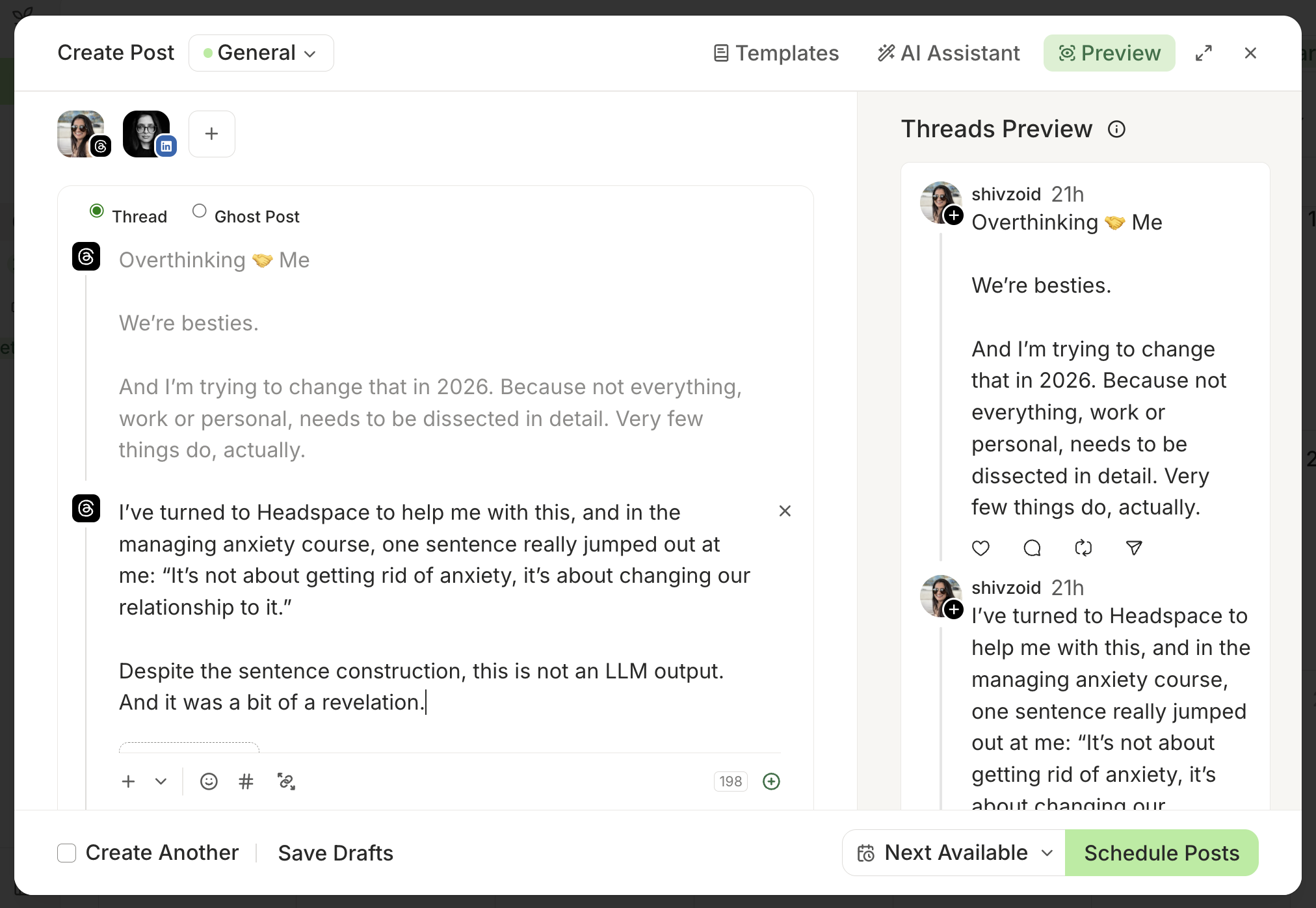
On the Team plan, anyone who needs sign-off hits “Save and Request Approval” instead of scheduling, and an approver can edit, approve and schedule, or reject.
You don’t even have to think about when to post. You can set up posting slots for each channel, and when you hit schedule, a post gets added to the queue and will be published in the next available slot. You can treat it as a “set it and forget it” schedule, or change it at any time.
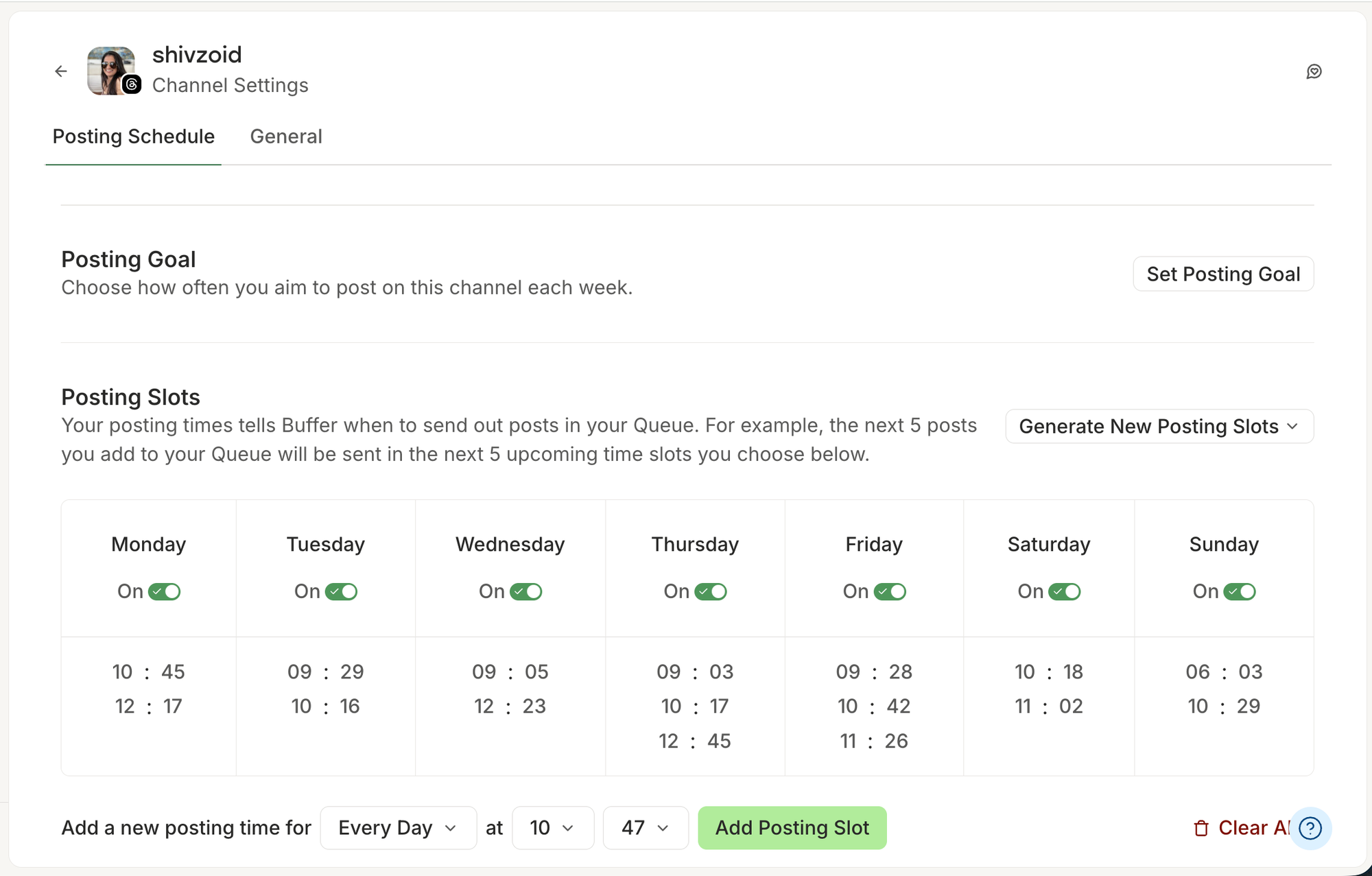
Under ‘Generate New Posting Slots,’ you’ll find the option to ‘Set Recommended Times,’ which autopopulates your schedule with the best times to post for maximum engagement, based on the latest data from Buffer’s data science team.
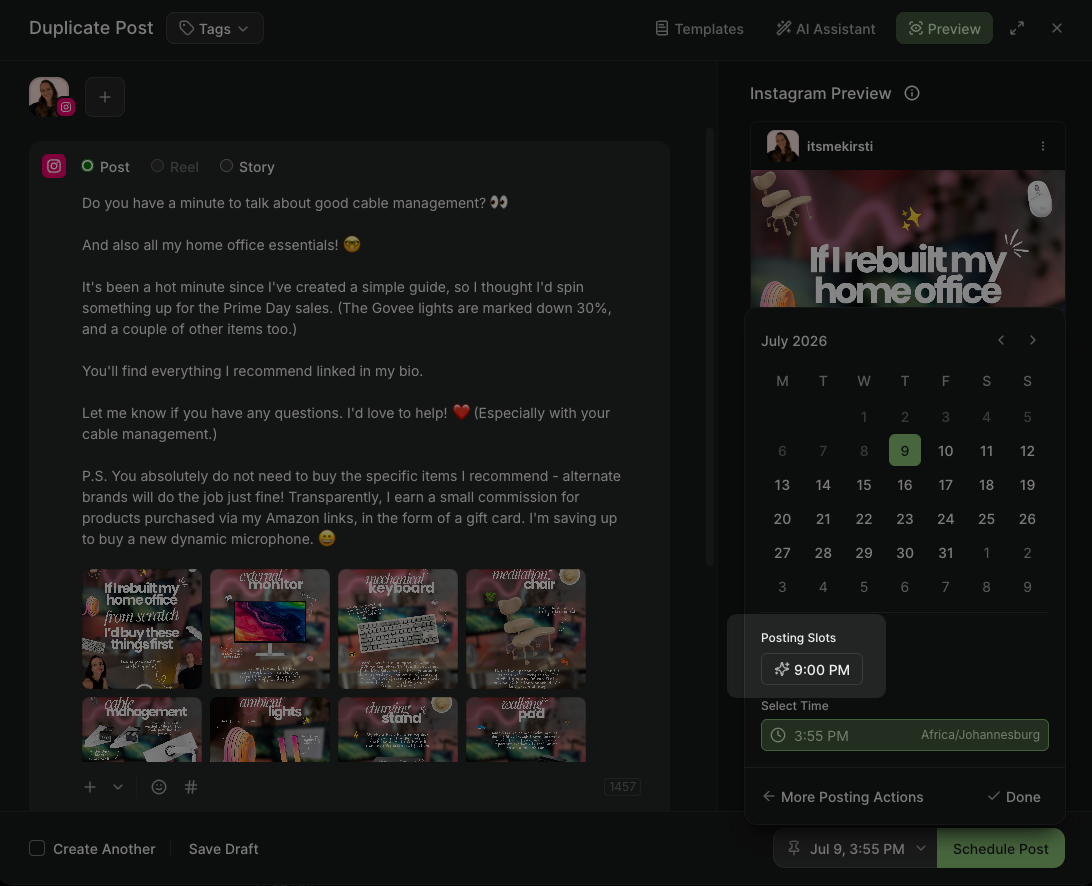
You can also get optimized posting times within the composer window, as in the screenshot below (one of my favorite features!).
You can also bulk upload posts using a CSV file. These posts automatically get added to your queue for the channel you’ve selected, or you can add a custom time for one or more posts in the CSV file.
Metricool’s planner works differently. There’s no “set it and forget it” queue for individual posts. You open the planner and click on the create post button or on the calendar to open the composer. There, you can compose, customize, send for review, and schedule.
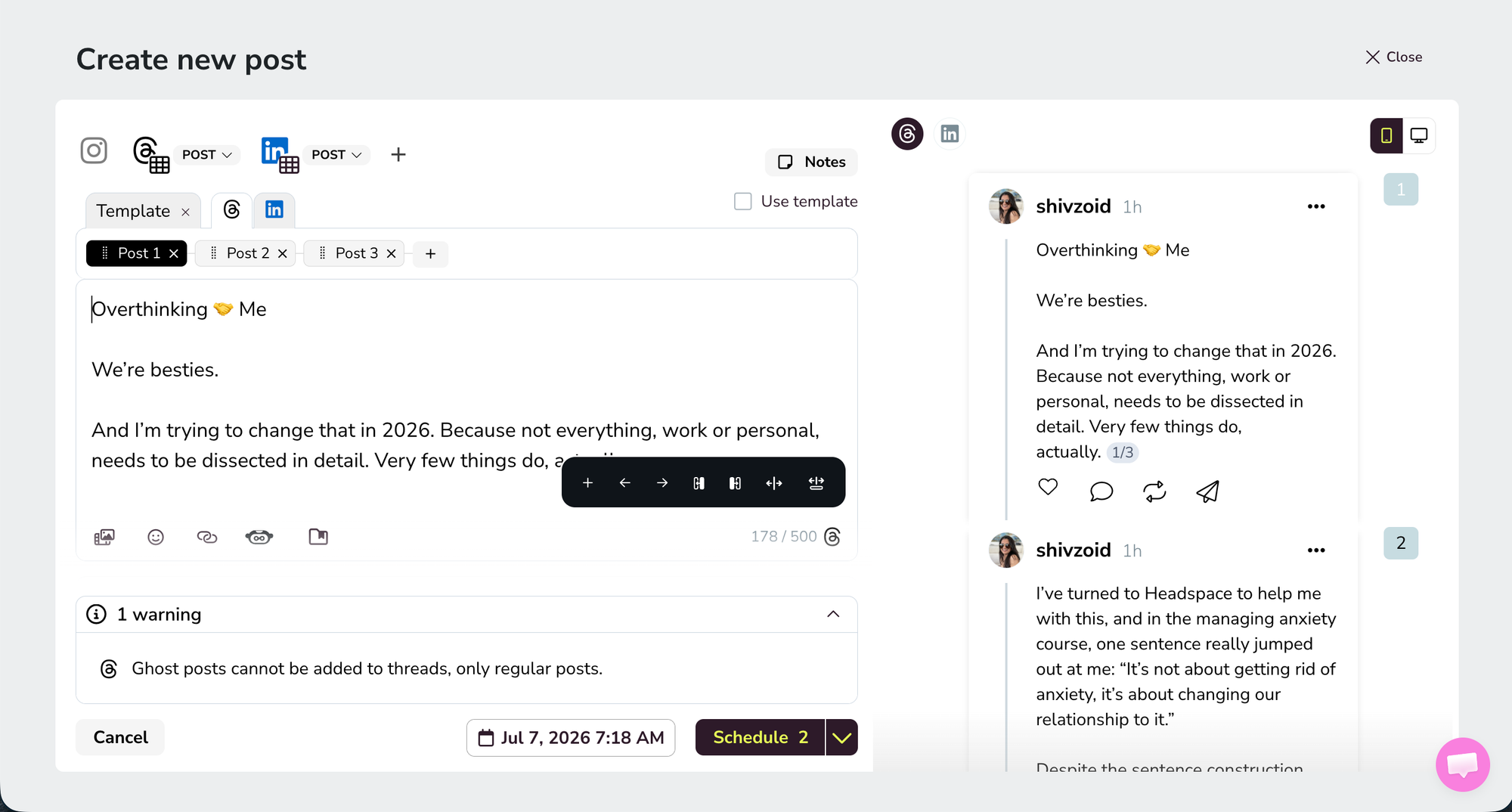
For some channels, the calendar view has a heatmap for the best times to post. You can drag and drop scheduled posts onto a time slot of your choice.
Metricool also offers autolists, a feature that loops content automatically at specific times you choose. Unlike Buffer’s queue, these set times apply only to autolist posts. You can connect it to an RSS feed for your blog or YouTube channel, or use it to publish the same posts again on a recurring schedule.
If your content is mostly fresh posts, Buffer's queue keeps things moving without much overhead. If you're regularly recycling evergreen content or syndicating from an RSS feed, Metricool's autolist feature makes that easy to do.
Analytics and reporting
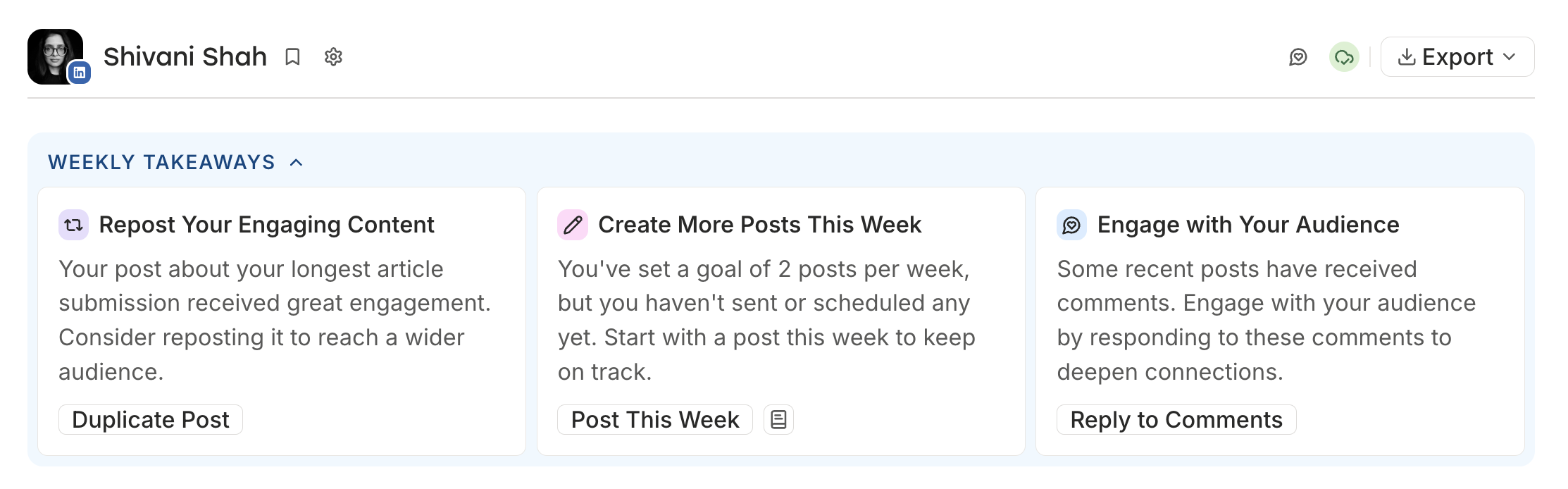
Buffer Insights are simple, designed to help you interpret the numbers, rather than just present them to you. The AI-powered takeaways go through that data and come back with specific suggestions like engaging with your audience, repurposing a post, or posting more in a certain content format.
Insights is available on every plan and covers post-level performance and follower growth data across your channels.
You can set any time range — the past 7 days, the past 30 days, the past quarter — and compare it against the same period before it or the same period last year. That flexibility is useful when you want to see how your numbers have shifted over time, not just week to week or month to month.
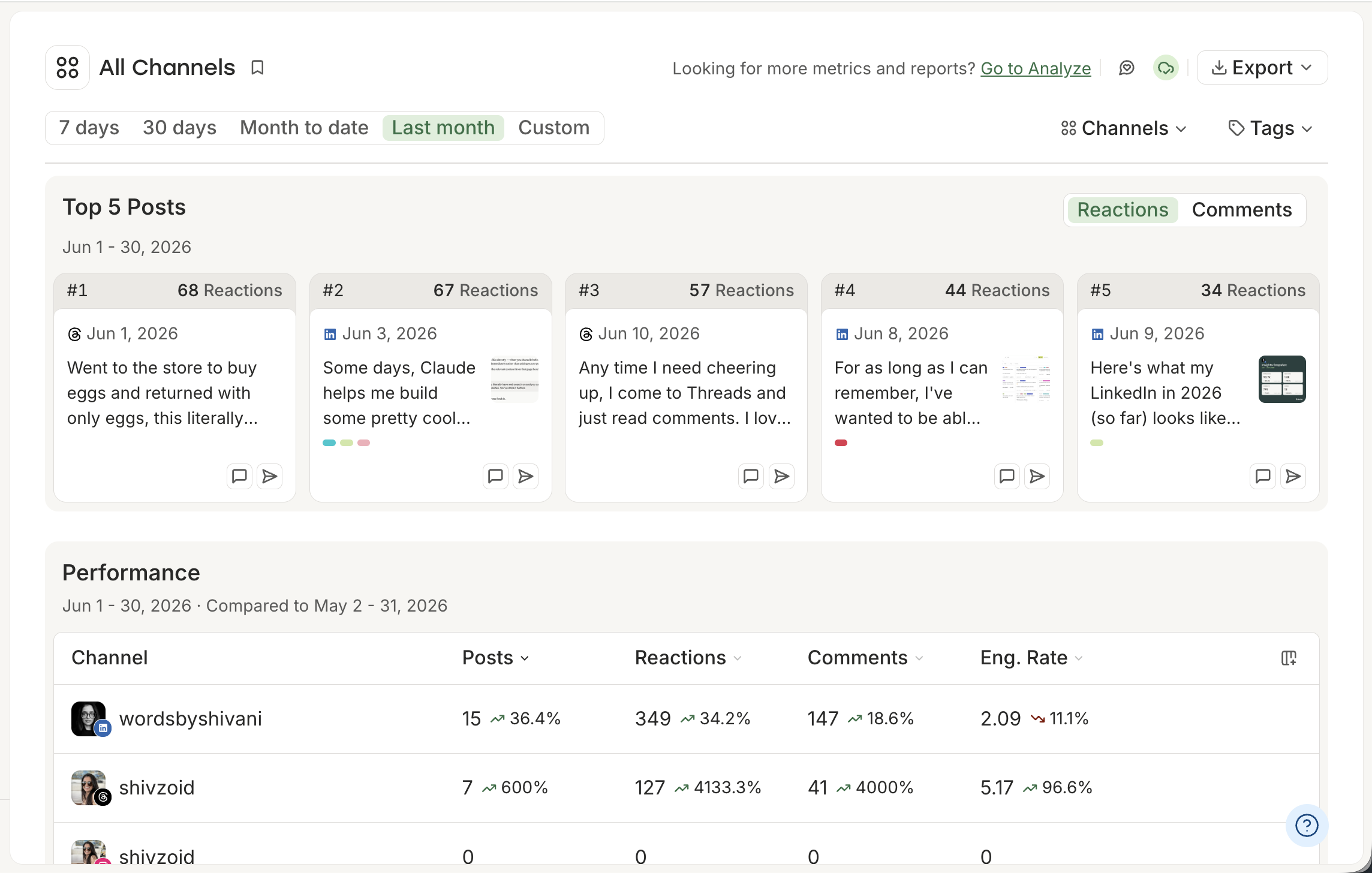
Paid plans also come with PDF, Markdown, and CSV export options. PDF reports are available for all your channels combined or broken down by individual channels, which is useful if you need to share the data with a client or stakeholder.
Markdown and CSV formats work well if you want to pull your data into ChatGPT, Claude, or your LLM or custom tool built on the API to dig into the numbers yourself.
📍 See Buffer's full analytics breakdown →
Metricool is great, but a little different. It packs a lot into its reporting for the price. You get platform-by-platform breakdowns, a custom report builder, granular post-level data, and audience demographics across every connected channel. You can also connect your website and see which posts and campaigns are sending people your way.
On paid plans, you can customize reports and download them in PDF or PowerPoint formats, schedule monthly email reports to go out automatically to multiple recipients, and include a personalized message with each one.
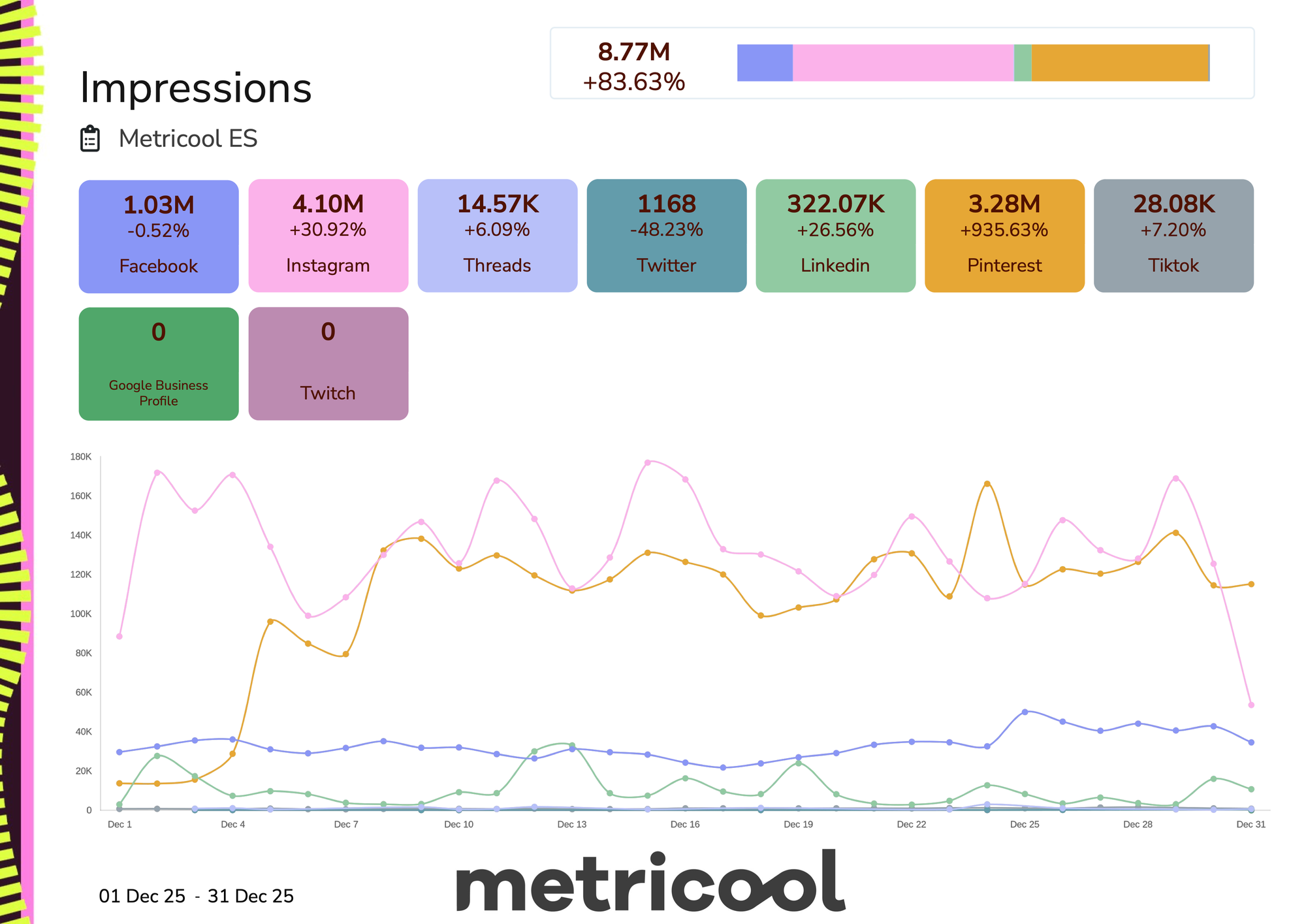
There's more on the advanced side, too. At the time of writing this, paid plan users get free access to advanced reporting, with caps based on your plan. This includes Metricool Studio, which lets you create AI-generated reports to analyze brand metrics, compare brands, or compare multiple periods of the same brand. Unlimited advanced reports are a paid add-on.
Metricool also connects directly to Google's Data Studio (formerly Looker Studio), so you can pull your data in and build custom dashboards there.
All of that adds up to a reporting setup that's impressive at this price point.
There's also a hashtag tracker, which costs €25 to track any hashtag for 24 hours per social network.
If your job involves regular, detailed stakeholder reports, Metricool handles that natively. If you want to understand what's resonating and decide what to post next, Buffer's Insights are faster to read.
Inbox and engagement
Both Buffer and Metricool let you engage with your audience without leaving the tool, with different approaches.
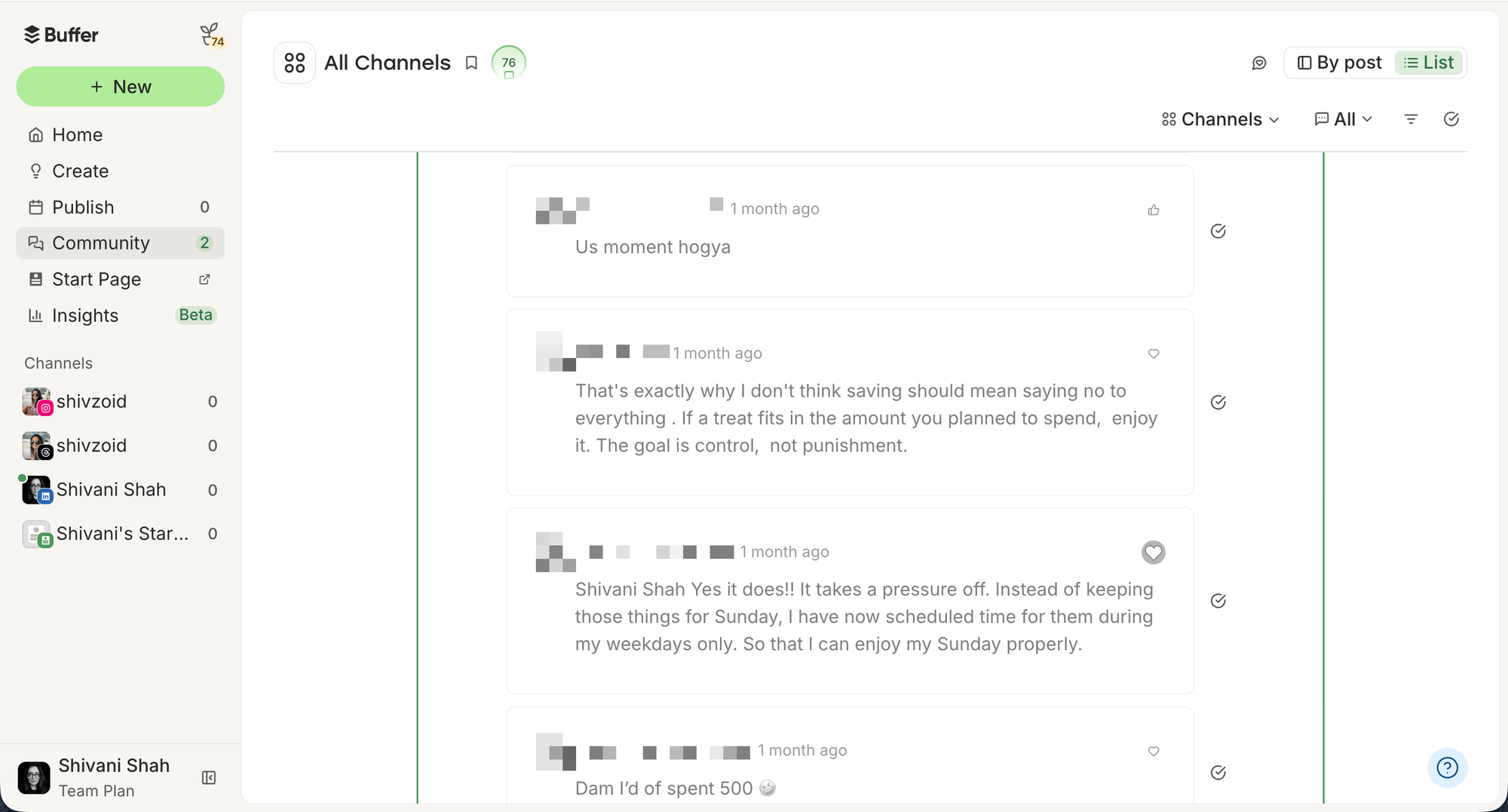
Buffer focuses on comment management and covers a lot of ground: You can use it to track and reply to both comments and mentions on Facebook Pages, Threads, Bluesky, LinkedIn profiles and pages, X/Twitter, Instagram professional accounts, Google Business Profiles, TikTok, YouTube, and Mastodon.
Buffer’s AI assistant also suggests replies, so you can respond quickly or use the suggestion as a starting point and take it from there.
Some other great quality-of-life features are the ability to save replies you’ll use often (like responses to frequently asked questions), plus a Comment Score, to incentivize you and your team to stay on top of responses.
Metricool’s engagement covers Facebook Pages, Instagram professional accounts, LinkedIn Pages, X/Twitter, and Google Business Profiles. It’s a narrower set than Buffer, and it doesn't include LinkedIn personal profiles.
Where Metricool goes further is in DMs: it supports direct messages on Facebook, Instagram, and X, which Buffer doesn't.
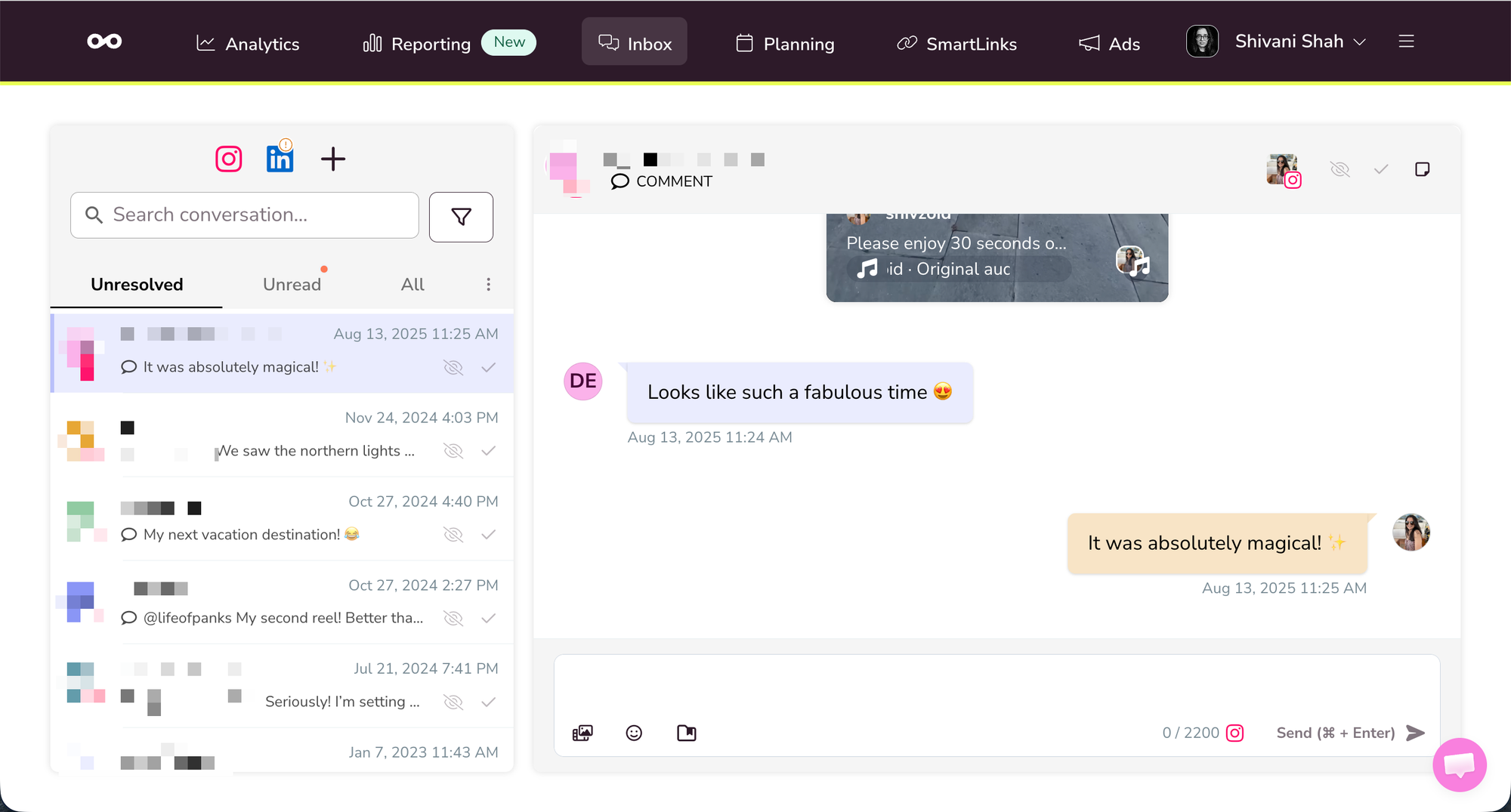
Which one works better for you comes down to what your engagement looks like — a wide range of platforms for comments, or a tighter set of platforms that includes DMs.
Competitor tracking
Metricool has a built-in competitor tracking feature that lets you monitor other accounts' performance, which is something Buffer doesn't offer.
You can add competitor profiles from Instagram, Facebook, Threads, Bluesky, and Twitch on all plans. If you’re on a paid plan, YouTube and X/Twitter are in the mix too.
You get up to five competitor profiles on the Free plan, but there’s a catch: once you've added one, you can't edit or delete it. It's worth being selective from the start. Paid plans don't have that restriction, and you can track up to 100 profiles that you can swap out at any time.
For each competitor, you get metrics like followers, replies, likes, reposts, views, and quotes. You can spot what's working in your niche, benchmark your own performance, and pull competitor performance straight into your monthly reports.
Buffer doesn’t compete on this. Buffer’s focus is on creating and publishing your own content well, so competitor tracking isn't something it offers.
API and MCP
If you’ve ever wanted your social media management tool to talk to the other apps in your workflow, both Buffer and Metricool have options for that.
Buffer’s API is available on all plans, including Free. I’ve used it to build two workflows and, as a non-technical person, I can tell you it's easier to get started with than you might expect.
I’m not the only one. Buffer users have built some really cool things with the API, like a content engine that took the creator from impulse-posting to 21 scheduled posts a week, and a custom app that replaced three separate platform integrations with a single API call. If you like to tinker, the API opens up possibilities for how to make your social media workflow your own.
Beyond the API, Buffer also has an MCP that connects to tools many folks are already working in, like Claude, ChatGPT, Perplexity, Cursor, and Raycast. Ask them what's scheduled for the week, brainstorm ideas and save them directly to Buffer, or draft and schedule posts without switching tabs.
Metricool has an MCP too, and it's available on all plans — just keep in mind that your plan limits still apply when you use it. Posts scheduled through the MCP count toward your monthly limit on the Free plan the same way anything else does.
Where Metricool differs is on the API side: it's only available on Advanced and Custom plans, and it covers metrics access and export as well as scheduling and publishing automation.
AI features
One area where Buffer and Metricool take different approaches is AI.
Buffer's AI Assistant is available on every plan, including Free, with no cap on how much you use it. You can generate post ideas, write drafts, repurpose content for different platforms, create alt text for images, and brainstorm hooks whenever you need to.
Outside of the scheduling features, AI-suggested replies are built into the Community inbox so you have something to work from instead of starting from scratch with each reply.
And in Insights, the AI goes through your performance data and comes back with specific suggestions — repurpose a post that did well, try a different content format, engage more with your audience — tailored to your account.
Metricool's AI text generator covers a lot of similar ground: post ideas, captions, hashtag suggestions. Where it differs is in its usage caps. On the Free plan, you get 5 monthly AI credits total. On the Advanced plan, that goes up to 35 credits per brand per month. If you're drafting with AI’s help regularly, those limits arrive sooner than you'd think.
One feature of Metricool’s AI is brand voice configuration. You can set custom instructions for each brand, and go a level deeper by giving each platform within that brand its own voice.
Your LinkedIn posts and your TikTok captions can sound different and platform-specific while still sounding like you. For anyone managing multiple brands or writing for clients, that saves time in the drafting process.
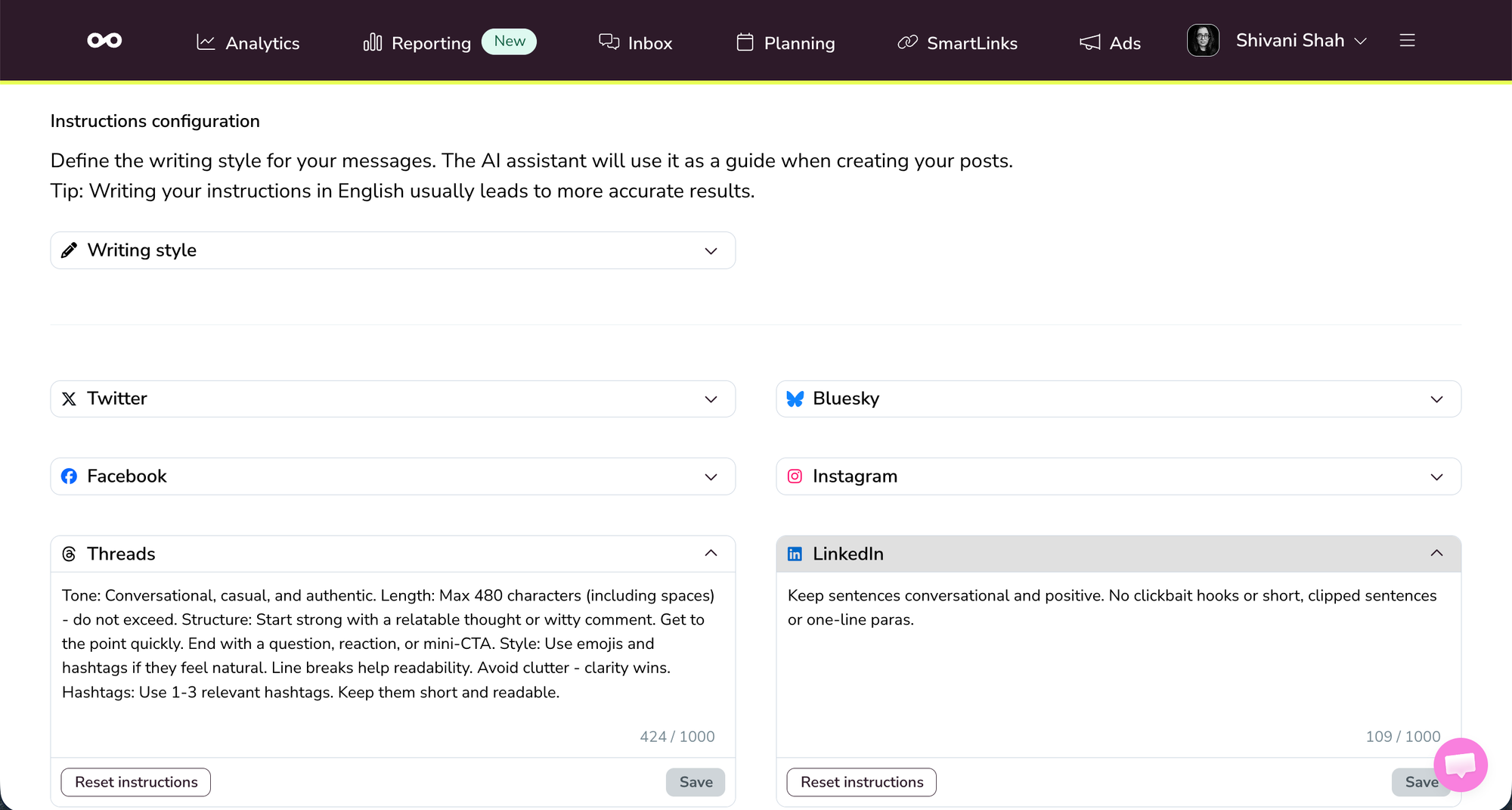
Buffer's AI Assistant doesn't have brand voice settings, so the output is more of a starting point than a finished draft.
Metricool also has AI-generated reports through Metricool Studio, which I covered in the analytics section. They're available at no extra cost on paid plans for now, though they'll move to a paid add-on later.
On Buffer, you can lean on AI as a normal part of your daily workflow on any plan. On Metricool, the monthly caps mean you'll want to be more deliberate about when you use them.
Supported platforms and integrations
The platform coverage between the two tools is close.
Buffer currently supports 11: Instagram (personal, creator, and business profiles), Facebook, LinkedIn, X/Twitter, TikTok, YouTube (Shorts only), Pinterest, Google Business Profile, Threads, Bluesky, and Mastodon.
Metricool also supports 11 platforms: Instagram (business and creator profiles only), Facebook, LinkedIn, X/Twitter (paid add-on), TikTok, Theads, Bluesky YouTube, Pinterest, Google Business Profile, and Twitch.
| Platform | Buffer | Metricool |
|---|---|---|
| ✅ Personal, creator, and business profiles | ✅ Business and creator profiles only | |
| ✅ | ✅ | |
| ✅ | ✅ (Paid plans only) | |
| X/Twitter | ✅ | ✅ (Paid add-on) |
| TikTok | ✅ | ✅ |
| YouTube | ✅ Shorts only | ✅ |
| ✅ | ✅ | |
| Google Business Profile | ✅ | ✅ |
| Threads | ✅ | ✅ |
| Bluesky | ✅ | ✅ |
| Mastodon | ✅ | ❌ |
| Twitch | ❌ | ✅ |
| Total platforms supported | 11 | 11 |
Buffer has a track record of picking up newer platforms early. Mastodon is a good example — if that's part of your posting mix, Buffer is the only tool of the two that covers it.
If you schedule content around streams or publish on Twitch alongside other channels, that's coverage Buffer doesn't have. Metricool also has native ad management for Meta, TikTok, and Google Ads built into the same interface, so you can handle both organic and paid from one place.
Ease of use
The two tools have a pretty different feel from the moment you log in for the first time.
Getting started on Buffer takes a few minutes. Connect your channels, set a posting schedule, and start creating. Everything you need is ready to go almost immediately, which means most of your time goes into making content rather than learning where things live.
Metricool's interface is denser, and that density is a reflection of what it does. There's more to configure — reports, competitor tracking, autolists, ad management — so it takes longer to get oriented. For users who genuinely need that depth, the time spent learning it pays back. For users who don't, it can feel like a lot to work around.
Who should pick which tool
Both Buffer and Metricool have strong feature sets, and the right choice comes down to how you actually work. Here's how I'd think about it.
Creators and solopreneurs
Pick Buffer. The free plan is a genuine free plan, not a 7-day trial, and it includes the AI Assistant with no caps as well as the API and MCP. When you're ready to grow, Essentials at $6 per channel per month gives you unlimited posts and full analytics. For a solo creator on four channels, that's $24 per month total. Metricool's free plan won't get you very far if you post to LinkedIn or X/Twitter, and the Starter plan plus add-ons sits at around $30 per month for the same setup (including X).
Small businesses and growing teams
Pick Buffer (usually). The Team plan at $12 per channel per month includes unlimited users, approval workflows, and custom permissions by default. A five-person small business managing eight channels pays $96 per month total. Metricool's Advanced plan ($67 per month plus add-ons) gets you team features, but you'll feel the AI caps if your team drafts with AI regularly. If you specifically need competitor tracking or detailed client-facing reports, Metricool earns its place even at this size.
Marketing agencies
It depends. This is the segment where Metricool is strongest. The competitor tracking, customizable PDF reports, and per-brand pricing are built for agency workflows. If your day-to-day involves managing 10+ client brands and presenting monthly reports with competitive benchmarks, Metricool's Advanced plan is purpose-built for this.
Buffer is a stronger fit for agencies where the work is primarily about producing and scheduling content across client accounts — teams that want a clean, low-overhead tool rather than one built around analytics-heavy workflows. The Team plan is easy to onboard new team members onto, and the per-channel pricing adjusts naturally as your client roster changes.
Data-led marketers
Lean toward Metricool. If you spend most of your week inside analytics dashboards, building custom reports, tracking competitors, and pulling granular data, Metricool's reporting depth is hard to beat at this price. Buffer is not trying to be a deep analytics platform, and that's a deliberate choice.
Rounding up
Buffer and Metricool solve different problems for different kinds of users.
If you want clean scheduling, useful AI on every plan, a free plan that's genuinely usable, and pricing that scales sensibly with the platforms you use, Buffer is the stronger choice. Starting at $6 per channel per month (or free, if you're just getting started), it covers what most creators, small businesses, and growing teams need without forcing you to learn a complex tool.
If competitor tracking, deep custom reporting, and managing many brands at once are central to your work, and you're willing to learn a heavier interface and absorb the add-on pricing for X/Twitter, Metricool earns its place.
Both tools have free options, so the easiest way to decide is to set up both and spend a week using them the way you'd actually use them. The right one will become obvious fast.
We'd love for you to try Buffer. The free plan is a real free plan, with no credit card, no trial period, and no expiry date. Sign up here to get started.
Frequently asked questions
Can I switch from Metricool to Buffer?
Yes. Buffer's setup takes a few minutes: connect your channels, set your posting schedule, and start creating. There's no automatic way to bring scheduled posts over from Metricool, but you can start scheduling new content in Buffer right away. The free plan lets you test Buffer indefinitely without a trial period or expiry date.
Does Metricool have a free plan?
Yes, but it's limited. Metricool's free plan covers 1 brand with a maximum of 20 published posts per month total, and excludes LinkedIn and X/Twitter. It's best treated as a way to test the product before committing to a paid plan. Buffer's free plan, by contrast, includes 3 channels with 10 scheduled posts per channel (refillable at any time) and the AI Assistant and API access on every account.
Does Buffer have competitor tracking?
No. Buffer doesn't offer competitor tracking at any tier. If competitor tracking is a feature you actively use, Metricool is the stronger choice. It lets you track up to 100 competitor profiles across most major platforms with engagement and frequency reporting.
Which has better analytics, Buffer or Metricool?
It depends what "better" means for you. Metricool's analytics are deeper, with custom report builders and granular platform metrics. Buffer's analytics cover post performance, follower growth, and channel data too — and layer AI-powered takeaways on top that go through your data and come back with specific suggestions. For day-to-day content decisions, Buffer is faster. For monthly stakeholder reports with competitor benchmarks, Metricool is more flexible.
Is Metricool's AI Assistant unlimited?
No. Metricool's AI text generator is capped at 5 credits per month on the Free plan and 35 credits per brand per month on the Advanced plan ($67 per month). Buffer's AI Assistant is unlimited on every plan, including Free.
Is Buffer good for agencies?
Buffer's Team plan at $12 per channel per month includes unlimited users, approval workflows, and custom permissions. For agencies focused on content creation and scheduling for clients, Buffer scales well. For agencies that build strategy off competitor tracking and present detailed monthly reports to clients, Metricool's agency-focused plans are built for that workflow.
from Buffer Resources https://ift.tt/CxEVTi1
If you’re comparing social media management tools, Buffer and Metricool will probably both end up on your list — they certainly did for me! They’re in a similar price range, they cover similar platforms, and they show up in a lot of the same “best of” roundups.
They also have strengths in different areas, as I discovered upon extensive testing. 🤓 Which one works better for you comes down to how you work.
Buffer serves creators, solopreneurs, small businesses, agencies, and growing teams that want a simple, flexible publishing workflow and an easy way to stay on top of comments.
Metricool is built for marketers and agencies who want to track competitors and need detailed reporting to share with clients or stakeholders.
In this guide, I’ll compare both platforms so you can decide which is the right one for you.
Jump to a section:
Key takeaways
- Buffer offers a free-forever plan with 3 social channels, 10 scheduled posts per channel (refillable anytime), API access on every plan, and basic analytics. Metricool's Free plan covers 1 brand with a maximum of 20 published posts a month, although LinkedIn and X/Twitter aren’t available on the free plan.
- Buffer’s paid plans scale per channel; Metricool’s scale per brand with paid add-ons. Buffer's Essentials plan is $6 per channel per month. Metricool's Starter plan is $25 per month for 5 brands, with a $5 per month add-on for each X/Twitter account you connect.
- Buffer’s Team plan ($12 per channel per month) includes unlimited users. Metricool’s team features are part of the Advanced plan that starts at $67 per month for 15 brands.
- Metricool’s competitor tracking is a differentiator. It lets you track up to 100 competitor profiles on paid plans and 5 on Free. Buffer doesn’t offer competitor tracking.
- Buffer’s AI Assistant is unlimited on every plan. Metricool’s AI text generator is capped at 3 credits per month on Free and 35 per brand per month on Advanced.
- Buffer supports 11 platforms, including Mastodon and Instagram personal profiles. Metricool also supports 11 platforms, including Twitch, with X/Twitter supported as an add-on on paid plans for an additional $5 per month per X account.
Buffer vs. Metricool at a glance
| Feature | Buffer | Metricool |
|---|---|---|
| Free plan | Yes, 3 channels, 10 posts per channel (refillable), API access included | Yes, but limited to 20 published posts per month, excludes LinkedIn and X/Twitter |
| Starting paid price | $6 per channel per month (Essentials) | $25 per month (Starter) |
| Pricing model | Per channel | Per brand + $5 per month add-on for each X/Twitter account |
| Team features | Team plan: $12 per channel per month, unlimited users | Advanced plan: starts at $67 per month for 15 brands |
| AI Assistant | Unlimited on every plan, including Free | 5 credits per month on Free, 35 credits per brand on Advanced |
| Competitor tracking | Not available | Up to 100 competitor profiles on paid plans and 5 on Free plan |
| Analytics depth | Post, channel, and follower analytics with AI-powered takeaways on all plans | Deep platform-by-platform reporting with custom report builder |
| Unified inbox | Community inbox for comments on all plans | Inbox on paid plans for comments and DMs |
| Supported platforms | 10 (including Mastodon and Instagram personal profiles) | 11 (including Twitch) |
| Ad management | Not available | Native ad management for Meta, Google, and TikTok ads |
| Best for | Creators, solopreneurs, small businesses, and growing teams who want clean scheduling and comment management | Data-led marketers and agencies who need competitor tracking and detailed reporting |
Let's look at the differences in more detail.
Plans and pricing
Here's what plans on Buffer and Metricool cost as of June 2026.
Buffer pricing (billed monthly, annual saves 20%)
- Free: 3 channels, 10 scheduled posts per channel (refill anytime), 1 user, AI Assistant, API access, analytics, community inbox
- Essentials: $6 per channel per month. Unlimited posts, 1 user, advanced analytics, hashtag manager, first comment scheduling
- Team: $12 per channel per month. Unlimited posts, unlimited users, approval workflows, custom permissions
Buffer lets you build your own channel lineup. You can add the platforms you use, leave out the ones you don't, and your plan adjusts accordingly. You can also add multiple accounts on each social media platform.
See Buffer's full pricing guide here →
Metricool pricing (billed monthly; annual saves around 20%)
Metricool’s pricing is built around the concept of “brands.” One brand includes one account from each supported social platform.
- Free: 1 brand, up to 20 published posts per month, no LinkedIn or X
- Starter: starts at $25 per month for 5 brands, basic analytics, 100 scheduled posts per month, AI text limited
- Advanced: starts at $67 per month for 15 brands, team features, deeper reporting, 35 credits for AI generations per brand
- Add-ons across paid plans: $5 per month per X/Twitter account
I want to make sure I flagged the add-on structure clearly, because I think it's the part most people may miss when comparing the entry-level pricing.
If you post to LinkedIn, you’ll need a paid plan on Metricool. It’s also worth noting that you can connect to either a LinkedIn profile or a LinkedIn page on one brand, but not both.
See Metricool's full pricing guide here →
What this means in practice
Here's a real scenario: a solo creator posting to Instagram, TikTok, LinkedIn, and X/Twitter.
- Buffer Essentials: 4 channels x $6 per month = $24 per month. Everything included.
- Metricool Starter: $25 per month base + $5 X/Twitter add-on = $30 per month.
That’s fairly close at four channels. For each channel you add, your Buffer plan would go up by $6 per month, while Metricool would stay at $30. If you drop it down to three, the price would drop to $18 on Buffer and stay $30 on Metricool.
Scale it up to a three-person small business managing eight channels (two Instagram accounts, two Facebook pages, two LinkedIn pages, one TikTok, one X/Twitter):
- Buffer Team: 8 channels x $12 per month = $96 per month. All three team members included.
- Metricool Advanced: $67 per month base + 1 X/Twitter add-on ($5) = $72/month.
Again, the price would change (up or down) if you added or dropped channels on Buffer, while Metricool’s stays at $67 per month.
Since a brand on Metricool means one account from each supported social platform, this works well for most people. If you’re managing more than one — a founder’s LinkedIn plus the company page, or one Facebook Group for your wedding photography business and another for corporate events — each one needs its own brand, which means your reporting is split across brands rather than in one place. It won’t add to your costs, but it’s worth knowing before you set things up.
Scheduling and publishing
Both Buffer and Metricool let you schedule posts across multiple platforms from a single dashboard. The differences show up in their interfaces and in how complex each one is to use.
Buffer's scheduling is intentionally simple. Write your post in the composer, choose your channels, customize per platform if you need to, and schedule.
On the Team plan, anyone who needs sign-off hits “Save and Request Approval” instead of scheduling, and an approver can edit, approve and schedule, or reject.
You don’t even have to think about when to post. You can set up posting slots for each channel, and when you hit schedule, a post gets added to the queue and will be published in the next available slot. You can treat it as a “set it and forget it” schedule, or change it at any time.
Under ‘Generate New Posting Slots,’ you’ll find the option to ‘Set Recommended Times,’ which autopopulates your schedule with the best times to post for maximum engagement, based on the latest data from Buffer’s data science team.
You can also get optimized posting times within the composer window, as in the screenshot below (one of my favorite features!).
You can also bulk upload posts using a CSV file. These posts automatically get added to your queue for the channel you’ve selected, or you can add a custom time for one or more posts in the CSV file.
Metricool’s planner works differently. There’s no “set it and forget it” queue for individual posts. You open the planner and click on the create post button or on the calendar to open the composer. There, you can compose, customize, send for review, and schedule.
For some channels, the calendar view has a heatmap for the best times to post. You can drag and drop scheduled posts onto a time slot of your choice.
Metricool also offers autolists, a feature that loops content automatically at specific times you choose. Unlike Buffer’s queue, these set times apply only to autolist posts. You can connect it to an RSS feed for your blog or YouTube channel, or use it to publish the same posts again on a recurring schedule.
If your content is mostly fresh posts, Buffer's queue keeps things moving without much overhead. If you're regularly recycling evergreen content or syndicating from an RSS feed, Metricool's autolist feature makes that easy to do.
Analytics and reporting
Buffer Insights are simple, designed to help you interpret the numbers, rather than just present them to you. The AI-powered takeaways go through that data and come back with specific suggestions like engaging with your audience, repurposing a post, or posting more in a certain content format.
Insights is available on every plan and covers post-level performance and follower growth data across your channels.
You can set any time range — the past 7 days, the past 30 days, the past quarter — and compare it against the same period before it or the same period last year. That flexibility is useful when you want to see how your numbers have shifted over time, not just week to week or month to month.
Paid plans also come with PDF, Markdown, and CSV export options. PDF reports are available for all your channels combined or broken down by individual channels, which is useful if you need to share the data with a client or stakeholder.
Markdown and CSV formats work well if you want to pull your data into ChatGPT, Claude, or your LLM or custom tool built on the API to dig into the numbers yourself.
📍 See Buffer's full analytics breakdown →
Metricool is great, but a little different. It packs a lot into its reporting for the price. You get platform-by-platform breakdowns, a custom report builder, granular post-level data, and audience demographics across every connected channel. You can also connect your website and see which posts and campaigns are sending people your way.
On paid plans, you can customize reports and download them in PDF or PowerPoint formats, schedule monthly email reports to go out automatically to multiple recipients, and include a personalized message with each one.
There's more on the advanced side, too. At the time of writing this, paid plan users get free access to advanced reporting, with caps based on your plan. This includes Metricool Studio, which lets you create AI-generated reports to analyze brand metrics, compare brands, or compare multiple periods of the same brand. Unlimited advanced reports are a paid add-on.
Metricool also connects directly to Google's Data Studio (formerly Looker Studio), so you can pull your data in and build custom dashboards there.
All of that adds up to a reporting setup that's impressive at this price point.
There's also a hashtag tracker, which costs €25 to track any hashtag for 24 hours per social network.
If your job involves regular, detailed stakeholder reports, Metricool handles that natively. If you want to understand what's resonating and decide what to post next, Buffer's Insights are faster to read.
Inbox and engagement
Both Buffer and Metricool let you engage with your audience without leaving the tool, with different approaches.
Buffer focuses on comment management and covers a lot of ground: You can use it to track and reply to both comments and mentions on Facebook Pages, Threads, Bluesky, LinkedIn profiles and pages, X/Twitter, Instagram professional accounts, Google Business Profiles, TikTok, YouTube, and Mastodon.
Buffer’s AI assistant also suggests replies, so you can respond quickly or use the suggestion as a starting point and take it from there.
Some other great quality-of-life features are the ability to save replies you’ll use often (like responses to frequently asked questions), plus a Comment Score, to incentivize you and your team to stay on top of responses.
Metricool’s engagement covers Facebook Pages, Instagram professional accounts, LinkedIn Pages, X/Twitter, and Google Business Profiles. It’s a narrower set than Buffer, and it doesn't include LinkedIn personal profiles.
Where Metricool goes further is in DMs: it supports direct messages on Facebook, Instagram, and X, which Buffer doesn't.
Which one works better for you comes down to what your engagement looks like — a wide range of platforms for comments, or a tighter set of platforms that includes DMs.
Competitor tracking
Metricool has a built-in competitor tracking feature that lets you monitor other accounts' performance, which is something Buffer doesn't offer.
You can add competitor profiles from Instagram, Facebook, Threads, Bluesky, and Twitch on all plans. If you’re on a paid plan, YouTube and X/Twitter are in the mix too.
You get up to five competitor profiles on the Free plan, but there’s a catch: once you've added one, you can't edit or delete it. It's worth being selective from the start. Paid plans don't have that restriction, and you can track up to 100 profiles that you can swap out at any time.
For each competitor, you get metrics like followers, replies, likes, reposts, views, and quotes. You can spot what's working in your niche, benchmark your own performance, and pull competitor performance straight into your monthly reports.
Buffer doesn’t compete on this. Buffer’s focus is on creating and publishing your own content well, so competitor tracking isn't something it offers.
API and MCP
If you’ve ever wanted your social media management tool to talk to the other apps in your workflow, both Buffer and Metricool have options for that.
Buffer’s API is available on all plans, including Free. I’ve used it to build two workflows and, as a non-technical person, I can tell you it's easier to get started with than you might expect.
I’m not the only one. Buffer users have built some really cool things with the API, like a content engine that took the creator from impulse-posting to 21 scheduled posts a week, and a custom app that replaced three separate platform integrations with a single API call. If you like to tinker, the API opens up possibilities for how to make your social media workflow your own.
Beyond the API, Buffer also has an MCP that connects to tools many folks are already working in, like Claude, ChatGPT, Perplexity, Cursor, and Raycast. Ask them what's scheduled for the week, brainstorm ideas and save them directly to Buffer, or draft and schedule posts without switching tabs.
Metricool has an MCP too, and it's available on all plans — just keep in mind that your plan limits still apply when you use it. Posts scheduled through the MCP count toward your monthly limit on the Free plan the same way anything else does.
Where Metricool differs is on the API side: it's only available on Advanced and Custom plans, and it covers metrics access and export as well as scheduling and publishing automation.
AI features
One area where Buffer and Metricool take different approaches is AI.
Buffer's AI Assistant is available on every plan, including Free, with no cap on how much you use it. You can generate post ideas, write drafts, repurpose content for different platforms, create alt text for images, and brainstorm hooks whenever you need to.
Outside of the scheduling features, AI-suggested replies are built into the Community inbox so you have something to work from instead of starting from scratch with each reply.
And in Insights, the AI goes through your performance data and comes back with specific suggestions — repurpose a post that did well, try a different content format, engage more with your audience — tailored to your account.
Metricool's AI text generator covers a lot of similar ground: post ideas, captions, hashtag suggestions. Where it differs is in its usage caps. On the Free plan, you get 5 monthly AI credits total. On the Advanced plan, that goes up to 35 credits per brand per month. If you're drafting with AI’s help regularly, those limits arrive sooner than you'd think.
One feature of Metricool’s AI is brand voice configuration. You can set custom instructions for each brand, and go a level deeper by giving each platform within that brand its own voice.
Your LinkedIn posts and your TikTok captions can sound different and platform-specific while still sounding like you. For anyone managing multiple brands or writing for clients, that saves time in the drafting process.
Buffer's AI Assistant doesn't have brand voice settings, so the output is more of a starting point than a finished draft.
Metricool also has AI-generated reports through Metricool Studio, which I covered in the analytics section. They're available at no extra cost on paid plans for now, though they'll move to a paid add-on later.
On Buffer, you can lean on AI as a normal part of your daily workflow on any plan. On Metricool, the monthly caps mean you'll want to be more deliberate about when you use them.
Supported platforms and integrations
The platform coverage between the two tools is close.
Buffer currently supports 11: Instagram (personal, creator, and business profiles), Facebook, LinkedIn, X/Twitter, TikTok, YouTube (Shorts only), Pinterest, Google Business Profile, Threads, Bluesky, and Mastodon.
Metricool also supports 11 platforms: Instagram (business and creator profiles only), Facebook, LinkedIn, X/Twitter (paid add-on), TikTok, Theads, Bluesky YouTube, Pinterest, Google Business Profile, and Twitch.
| Platform | Buffer | Metricool |
|---|---|---|
| ✅ Personal, creator, and business profiles | ✅ Business and creator profiles only | |
| ✅ | ✅ | |
| ✅ | ✅ (Paid plans only) | |
| X/Twitter | ✅ | ✅ (Paid add-on) |
| TikTok | ✅ | ✅ |
| YouTube | ✅ Shorts only | ✅ |
| ✅ | ✅ | |
| Google Business Profile | ✅ | ✅ |
| Threads | ✅ | ✅ |
| Bluesky | ✅ | ✅ |
| Mastodon | ✅ | ❌ |
| Twitch | ❌ | ✅ |
| Total platforms supported | 11 | 11 |
Buffer has a track record of picking up newer platforms early. Mastodon is a good example — if that's part of your posting mix, Buffer is the only tool of the two that covers it.
If you schedule content around streams or publish on Twitch alongside other channels, that's coverage Buffer doesn't have. Metricool also has native ad management for Meta, TikTok, and Google Ads built into the same interface, so you can handle both organic and paid from one place.
Ease of use
The two tools have a pretty different feel from the moment you log in for the first time.
Getting started on Buffer takes a few minutes. Connect your channels, set a posting schedule, and start creating. Everything you need is ready to go almost immediately, which means most of your time goes into making content rather than learning where things live.
Metricool's interface is denser, and that density is a reflection of what it does. There's more to configure — reports, competitor tracking, autolists, ad management — so it takes longer to get oriented. For users who genuinely need that depth, the time spent learning it pays back. For users who don't, it can feel like a lot to work around.
Who should pick which tool
Both Buffer and Metricool have strong feature sets, and the right choice comes down to how you actually work. Here's how I'd think about it.
Creators and solopreneurs
Pick Buffer. The free plan is a genuine free plan, not a 7-day trial, and it includes the AI Assistant with no caps as well as the API and MCP. When you're ready to grow, Essentials at $6 per channel per month gives you unlimited posts and full analytics. For a solo creator on four channels, that's $24 per month total. Metricool's free plan won't get you very far if you post to LinkedIn or X/Twitter, and the Starter plan plus add-ons sits at around $30 per month for the same setup (including X).
Small businesses and growing teams
Pick Buffer (usually). The Team plan at $12 per channel per month includes unlimited users, approval workflows, and custom permissions by default. A five-person small business managing eight channels pays $96 per month total. Metricool's Advanced plan ($67 per month plus add-ons) gets you team features, but you'll feel the AI caps if your team drafts with AI regularly. If you specifically need competitor tracking or detailed client-facing reports, Metricool earns its place even at this size.
Marketing agencies
It depends. This is the segment where Metricool is strongest. The competitor tracking, customizable PDF reports, and per-brand pricing are built for agency workflows. If your day-to-day involves managing 10+ client brands and presenting monthly reports with competitive benchmarks, Metricool's Advanced plan is purpose-built for this.
Buffer is a stronger fit for agencies where the work is primarily about producing and scheduling content across client accounts — teams that want a clean, low-overhead tool rather than one built around analytics-heavy workflows. The Team plan is easy to onboard new team members onto, and the per-channel pricing adjusts naturally as your client roster changes.
Data-led marketers
Lean toward Metricool. If you spend most of your week inside analytics dashboards, building custom reports, tracking competitors, and pulling granular data, Metricool's reporting depth is hard to beat at this price. Buffer is not trying to be a deep analytics platform, and that's a deliberate choice.
Rounding up
Buffer and Metricool solve different problems for different kinds of users.
If you want clean scheduling, useful AI on every plan, a free plan that's genuinely usable, and pricing that scales sensibly with the platforms you use, Buffer is the stronger choice. Starting at $6 per channel per month (or free, if you're just getting started), it covers what most creators, small businesses, and growing teams need without forcing you to learn a complex tool.
If competitor tracking, deep custom reporting, and managing many brands at once are central to your work, and you're willing to learn a heavier interface and absorb the add-on pricing for X/Twitter, Metricool earns its place.
Both tools have free options, so the easiest way to decide is to set up both and spend a week using them the way you'd actually use them. The right one will become obvious fast.
We'd love for you to try Buffer. The free plan is a real free plan, with no credit card, no trial period, and no expiry date. Sign up here to get started.
Frequently asked questions
Can I switch from Metricool to Buffer?
Yes. Buffer's setup takes a few minutes: connect your channels, set your posting schedule, and start creating. There's no automatic way to bring scheduled posts over from Metricool, but you can start scheduling new content in Buffer right away. The free plan lets you test Buffer indefinitely without a trial period or expiry date.
Does Metricool have a free plan?
Yes, but it's limited. Metricool's free plan covers 1 brand with a maximum of 20 published posts per month total, and excludes LinkedIn and X/Twitter. It's best treated as a way to test the product before committing to a paid plan. Buffer's free plan, by contrast, includes 3 channels with 10 scheduled posts per channel (refillable at any time) and the AI Assistant and API access on every account.
Does Buffer have competitor tracking?
No. Buffer doesn't offer competitor tracking at any tier. If competitor tracking is a feature you actively use, Metricool is the stronger choice. It lets you track up to 100 competitor profiles across most major platforms with engagement and frequency reporting.
Which has better analytics, Buffer or Metricool?
It depends what "better" means for you. Metricool's analytics are deeper, with custom report builders and granular platform metrics. Buffer's analytics cover post performance, follower growth, and channel data too — and layer AI-powered takeaways on top that go through your data and come back with specific suggestions. For day-to-day content decisions, Buffer is faster. For monthly stakeholder reports with competitor benchmarks, Metricool is more flexible.
Is Metricool's AI Assistant unlimited?
No. Metricool's AI text generator is capped at 5 credits per month on the Free plan and 35 credits per brand per month on the Advanced plan ($67 per month). Buffer's AI Assistant is unlimited on every plan, including Free.
Is Buffer good for agencies?
Buffer's Team plan at $12 per channel per month includes unlimited users, approval workflows, and custom permissions. For agencies focused on content creation and scheduling for clients, Buffer scales well. For agencies that build strategy off competitor tracking and present detailed monthly reports to clients, Metricool's agency-focused plans are built for that workflow.
Comments
Post a Comment