
Let's be reel real: no matter how well-thought-out your Instagram strategy is, you can never predict exactly how it’s going to perform. Your followers (and potential followers) are human, after all, and there is so much nuance in the way folks behave online.
This is why I often advise aspiring Instagram creators and social media marketers to experiment. Try new things. Take risks. Don’t ignore those wild ideas.
And, while this might not feel like much of a hurdle on platforms like TikTok, it’s a little easier said than done as an Instagrammer. The platform is a lot more focused on a curated, aesthetic feed than others. It’s also a place where followers are hard-won. Taking risks and trying new things might result in some unfollows, which is scary.
How do you get around that? Instagram's answer is trial reels.
I've been using trial reels since Instagram launched them in December 2024, and they've changed how I decide what goes on my main feed. Over the past few months, I've almost tripled my Instagram following (I'm at over 13K now!). 🥳
Trial reels are one of the main tactics I used to get there.
In this article, I'll explain exactly how to use Instagram trial reels (I promise, it's so much easier than you think), how to schedule them, why you should if you're looking to grow your following on Instagram, and give you some ideas for your own tests.
Key takeaways
- Trial reels are shown only to non-followers, so you can test a reel without it appearing in your followers' feeds or on your profile.
- If you have a professional (business or creator) account, you'll need at least 200 followers, while personal accounts must have at least 1,000 followers.
- Trial reel insights appear anywhere between one and 24 hours after posting, and Instagram can share a trial with your followers automatically if it performs well within 72 hours.
- Trial reels reach far fewer people than regular reels (my usual trials top out at around 200 views, compared with 2,000–40,000 on my regular reels), so compare trials with other trials.
- Change one variable per test and keep everything else (caption, hashtags, location) identical.
Jump to a section:
- What are Instagram trial reels?
- How do Instagram trial reels work?
- Who can use trial reels (and why the option might be missing)
- How to schedule trial reels and track them in Buffer
- Are trial reels worth it? What my tests showed
- 3 tips for using Instagram trial reels
- 10 trial reel ideas to test
- Instagram trial reels FAQ
What are Instagram trial reels?
Trial reels are Instagram reels that are shown only to people who don't follow you, so you can test how a reel performs before your followers see it. They don't appear in your followers' feeds or on your profile unless you choose to share them.
Think of trial reels as your content testing ground.
Instagram head Adam Mosseri mentions trial reels in his own content often, and with good reason. "A great way to experiment is to use trial reels, which allow you to post a reel just to accounts that do not follow you,” he said in a video on reels tips. “And then you can decide if it does well if you want to upgrade it to your followers and to your profile.”
He added in another video about posting frequency:
“[Trial Reels] allow you to bypass the entire connected ranking system and just go straight to the unconnected recommendations, so you don't risk bothering people who followed you with too much content.”
Connected ranking system = the algorithm that serves your content to your followers.
Unconnected recommendations = the algorithms that serve your content to non-followers in the reels and explore feeds. (If you want the full picture, here's how the Instagram algorithm ranks reels.)
It's kind of like having a focus group for your Instagram Reels — you get real-world feedback from Instagram users who don't follow you (yet).
The best part: Your current followers won't see these experimental reels — unless you want them to. No more worrying about flooding their feeds or straying too far from what they expect from you.
Here's how a trial reel compares to a regular one:
| Feature | Trial reel | Regular reel |
|---|---|---|
| Who sees it first | Non-followers only | Followers and non-followers |
| Shows on your profile | No (unless you share it) | Yes |
| Insights available | After about 24 hours | Immediately, building over time |
| Typical reach | Lower — compare it with other trials | Your normal baseline |
| Can be shared with followers later | Yes, manually or automatically within 72 hours | N/A |
| Account needed | A public account: personal accounts need 1,000+ followers; Creator or Business accounts need 200+ | Any |
How do Instagram trial reels work?
Trial reels are straightforward, particularly if you regularly share Instagram Reels. Here's how to post one in the Instagram app:
- Create your reel as usual.
- Before sharing, turn on the Trial toggle.
- Choose whether Instagram should share it with your followers automatically if it performs well, or leave that decision to you.
- Share it (or schedule it — more on that below).
- After a few hours, go to your profile > reels tab > Drafts and trial reels.
- Tap the trial reel, then View reel insights.
- If it's hitting all the right notes, tap Share to everyone to send it to your followers.

If you set up automatic sharing, Instagram will share your trial reel with your followers if it performs well within the first 72 hours.
A few more things to know about trial reels in 2026:
- Eligibility: You can only post trial reels with a public account. Personal accounts need at least 1,000 followers to post trial reels. Creator or business accounts only need 200 followers. It's easy to switch — here's how.
- Scheduling: You can schedule your trial reel to go live later, either natively on Instagram or with Buffer.
- No collaborators: Trial reels can't include Collab partners.
Two important things to keep in mind about Instagram trial reels:
- Account type: You can only post trial reels with a public account. Personal accounts need at least 1,000 followers to post trial reels. Creator or business accounts only need 200 followers. Here's more on Instagram account types and how to switch.
- Who can still see a trial: While your followers won't see trials in their main, reels or explore feed, they might spot them if someone shares them in DMs or an Instagram Story, or on pages featuring reels with the same audio/location/filter.
After 24 hours (usually sooner), you'll get insights into how your trial reel is performing.

Since the reel won’t be visible on your profile, you’ll need to head over to your profile > reels tab, and then tap on the Trial reels card. (If you also have reels drafts, the tab will say Drafts and Trial Reels.)
From there, tap the trial reel, then Trial insights > View more insights. This will give you access to a dashboard that is very similar to the insights for regular reels. You’ll have metrics on:
- Skip rate
- Views
- Likes
- Comments
- Shares
- Saves
- Accounts reached
- Replays
- Watch time
- Average watch time


Skip rate is the metric I usually look at to determine whether or not a reel will be a success. If it's hitting all the right notes, you can share it with your followers from here, too.
Who can use trial reels (and why the option might be missing)
Trial reels are only available to public accounts. Personal account users will need at least 1,000 followers to publish trial reels, while professional (Creator or Business) accounts only need 200 followers.
If you don't see the Trial toggle when you share a reel, work through this list:
- Check your account type. Private accounts don't get trial reels, so switch to a public account.
- Check your follower count. If you have under 1,000 followers, switch to a creator or business account first. If you have fewer than 200 followers, you'll need to wait until you reach that milestone to access the feature (with a creator or business account).
- Update the Instagram app. New features often only show up on the latest version.
- Check Instagram's Help Center. Still stuck? Visit Instagram's Help Center to check the eligibility rules in your region.
The most likely reason is that you have under 200 followers or the wrong account type.
How to schedule trial reels and track them in Buffer
You can schedule trial reels in Buffer and track how they perform in Buffer Insights, right alongside the rest of your content. It's super handy if you're running several tests at once and want to keep everything in one place!
Here's how to schedule a trial reel in Buffer:
- Click the + New button to open the composer > Post.
- Select your Instagram channel, and choose Reel.
- Upload your video and add your caption.
- Scroll down to Trial Reel to toggle it on. (Note that you won't see this option if Notification posting is selected.)
- Choose Auto (to have the trial reel made visible to your followers and added to your feed automatically after 72 hours if it does well) or Manual (to choose if/when to make the reel fully visible).
- Pick a time, or add it to your posting schedule.

Once your trial reel is live, its performance shows up in Buffer Insights, so you can compare trials side by side — which is exactly how Mosseri suggests reading them (more on that below).
Are trial reels worth it? What my tests showed
Instagram trial reels offer you a way to test all sorts of things — hooks, music, editing style, subject matter, frequency, you name it.
And, since they're only shown to non-followers, they can be an important tool in helping you figure out what is actually going to grow your account.
For me, they turned out to be incredibly powerful. Not just in figuring out what will work best for my audience, but also in helping me actually reach the people I was trying to reach.
I started my Instagram account many years ago, and my focus back then was fitness. Since then, my interests have evolved a whole lot — my content is now about remote work and home office setups. It's quite a big pivot!
I considered starting a new Instagram account, but I was loath to lose the followers I already had, about 5,000 at the time. Still, I was stuck. I kept creating content I thought was pretty good, but it was being pushed to 5,000 people who had followed me to learn how to achieve good squat form... who weren't interested at all.
Using trial reels pushed the algorithm to find the best audience for the content I was actually making, rather than who I was making it for five years ago.
It took a few months of consistently A/B testing videos as trial reels, but I'm glad I stuck with it. A couple of breakout successes helped me grow my account significantly — I'm now at over 13K followers! The right ones this time.
Now, every single one of my reels goes out as a trial first, usually with two or three different spoken or text hooks.
Even if you're not attempting a niche pivot, the benefits of trial reels abound.
The benefits of trial reels:
- Test new content ideas without risking your current following
- Get feedback from fresh eyes
- Experiment with different niches or formats
- Answer very specific questions about your content (What song is the best for this reel? Should I include text or voiceovers? Which text hook is most interesting?)
- Eliminate worry about posting too much for your current followers
3 tips for using Instagram trial reels
As I touched on above, I've been playing around with Instagram trial reels for a while, and the experimentation has helped me make some pretty smart, informed decisions about my content plan moving forward.
1. Have a clear question you want an answer to
This is huge — I wouldn't advise just sharing every reel as a trial reel first without really understanding what you're testing.
I made that mistake with my first trial reel — it was just a video that I had planned and edited in my usual style. I created the trial without really knowing what I wanted to experiment with.
The content performed as expected, with a similar amount of reach and engagement to my regular reels, and — surprise, surprise — I didn't learn anything. (With this in mind, I can see why some commenters on Adam Mosseri's posts about trial reels label them as “pointless.”)
To get value from trial reels, you need to get crystal clear on what you want to know. Here's a solid example:
One of the first tests I ran was on the impact of using a voice-over vs. having an ASMR-style video with text overlays instead vs. trending audio.
I often create vlog-style day-in-the-life videos. I love the ASMR sounds I capture in the background of my clips (and I prefer to leave them as they are). But I had a sense that they weren't interesting enough without the storytelling I could provide in a voiceover. I also thought it might be fun to experiment with the impact of trending audio.
So I put this theory to the test, creating three versions of exactly the same video. They were identical down to the last hashtag, apart from the audio:
- Reel with a voiceover
- Reel ASMR background sounds
- Reel with trending audio
The results were interesting! I had expected the voiceover to win by a landslide, but it didn't. The clip featuring trending audio (#3) racked up the most views — 24% more views than the voiceover and 33% more than the ASMR (sob).
| Version | Views | Average watch time |
|---|---|---|
| Voiceover | Baseline | Tied for highest |
| ASMR background sounds | Lowest (trending audio got 33% more) | Lower |
| Trending audio | 24% more than voiceover | Tied for highest |
That's a very specific example (and one worth running for your audience!).
But now that I'm more experienced with trial reels, I find I mostly use them to test different spoken and text hooks. When I script or storyboard a video, I'll bake in two or three different intros to see which one captures the most attention. I find it only requires a little more effort — I'm already filming and editing; what's a few more seconds of footage?
Sometimes I'll keep most of the intro the same if I feel strongly about a spoken hook, and just experiment with the opening text. These are all the trial reels I have running right now — check out how many variations I've been exploring for just one video! You can tell I'm a nerd, right?
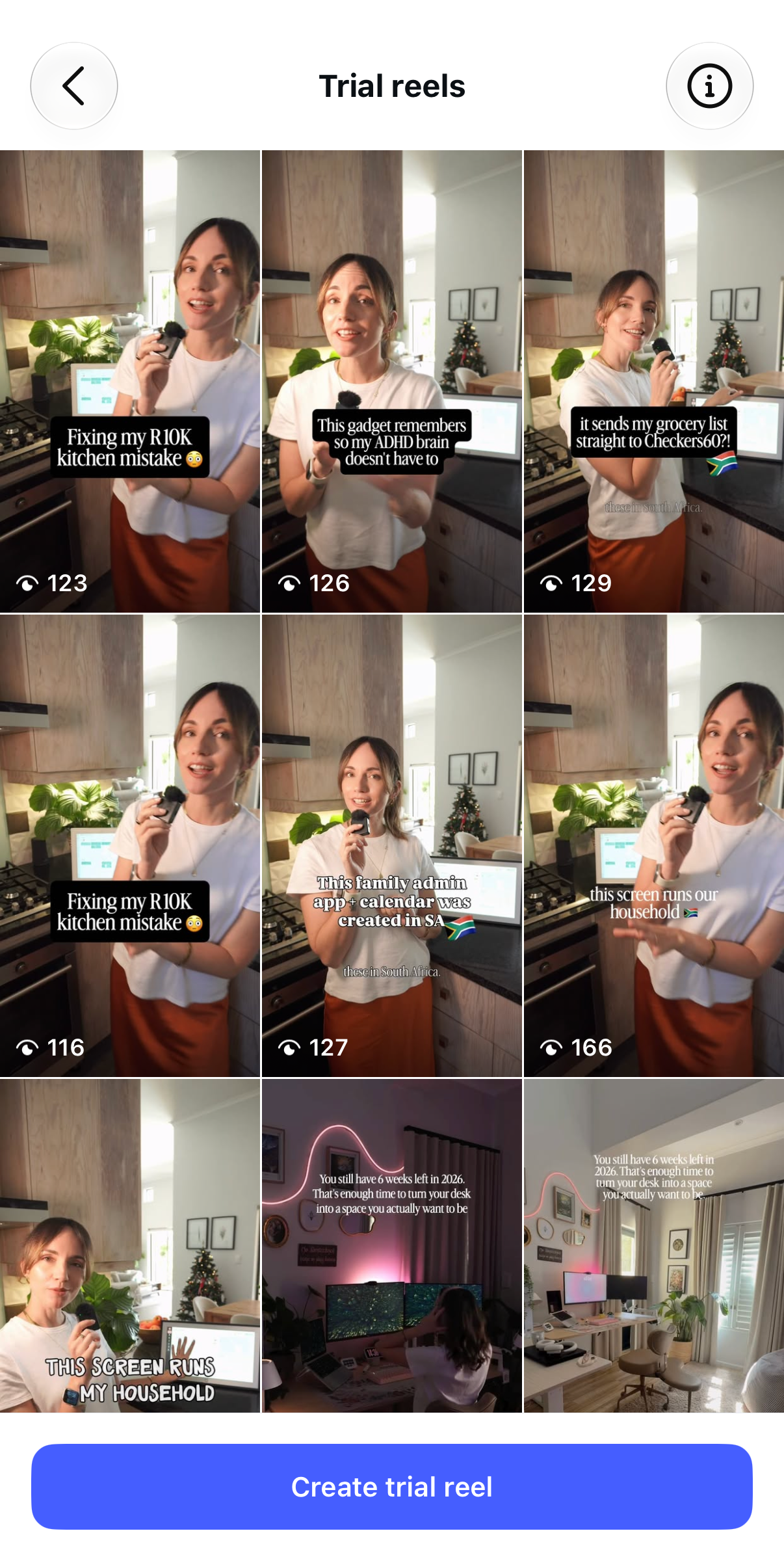
It takes an extra few minutes, and it's always worth it! I'm often surprised by which spoken or text hook wins.
2. Eliminate the variables
I know, I know. This advice is table stakes for any kind of experimentation (see, I was listening in 7th-grade science, Mr. Strydom!).
But I thought this was worth noting because there are so many little details you might forget to include if you're testing similar versions of the same reel.
For example, I forgot to include a location tag in one version of my A/B tests, which may have skewed the results. When I realized this, I had to delete the reel and run the test all over again.
Some small details you might forget in your tests are:
- Caption (unless you're testing the caption itself, make sure yours is identical)
- Location
- Hashtags
- Polls and prompts
3. Manage your expectations on results
When Instagram announced the trial reels feature in a video on the @creators account, one comment stood out to me: “I tried once, and it gave me like 75 views and 5 likes…”
The commenter was frustrated — clearly, it's not the kind of performance they were used to.
The thing is, though, trial reels aren't meant to be compared with regular reels. They should be compared with other trial reels.
“Because it's not going to your followers, you can't compare it to a normal reel,” Mosseri said in a helpful clip about trial reels. “It's going to get less reach, almost always.
“So what you need to do is compare trial reels to other trials. Look at sends, look at likes, look at watch time. That will give you a sense, get you calibrated on how good that trial reel is.”
For example, my regular reels usually get between 2,000 and 40,000 views on Instagram.
Many of my trial reels topped out at about 200 views unless they're viral reel material (which, I'll be honest, is pretty horrifying when you're used to a bit higher!).
Still, there were clear patterns in how the reels performed compared to the others, particularly if you're comparing different versions of the same reel.
Also, as Mosseri pointed out, the obvious metrics like views and likes aren't always the best measures of success. Average watch time is particularly interesting, especially if you're testing things like hooks or editing style.
Another note on managing expectations — do give your trial reels at least 24 hours, preferably more, to percolate. Even in Instagram's tooltips, they stress this:
“We're finding non-followers who we think will be interested in your new content, so it might take more time to get views, likes, and shares than your other reels.”
You really want to give your content a fair shot before you hit ‘Share to everyone’ or delete. So, if you're testing sponsored or brand content with a hard deadline, bear this in mind.
10 trial reel ideas to test
Not sure where to start with your Instagram trial reels? Here are some handy experiments you might want to consider running:
- What is the best time of day for me to post to reach new followers? Test the same reel shared at various times across different days (I'd suggest sharing them on different days, since there might be an overlap in the folks who see your reels, given trial reels need around 24 hours to find non-followers). Our data on the best times to post on Instagram is a good starting point for which slots to test.
- What kind of hook will work best? Test the same video with different intros. I'd suggest testing options that you can categorize and replicate (here are a few hook formulas worth testing). For example, if you're sharing a round-up of your favorite AI tools, you could try:
- Getting straight to the point: “These are my top 5 AI tools.”
- Inspiring intrigue: “These AI tools are so good, they should be illegal.”
- Sharing value upfront: “These AI tools will save you hours every single day.”
- What visual hooks have an impact? This is one I have planned! If you're talking to the camera, you could experiment with saying the same intro with different props or in different settings (the creator favorite of chatting while stirring iced coffee is a great example of a visual hook).
- Does trending audio really matter for my niche? Create identical reels with different audio tracks — one with a sound currently on the trending audio list, and another with a non-trending audio you like.
- Which caption style works best? Test the same reel with different caption approaches: a story-style caption, a quick bullet-point list, or a question-based caption that encourages comments.
- What's the sweet spot for reel length? Take a longer piece of content and create different cuts — perhaps 15, 30, and 60 seconds — to find the ideal duration for your content type. (Here's what our data says about how long your reels should be.)
- Do on-screen captions impact retention? Test identical reels with different text approaches: no captions, minimal key phrases, or full subtitles.
- Which call-to-action style works best? Experiment with different CTAs at the end of your reel: direct ("Follow for more!"), value-based ("Save this for your next project"), or question-based ("What would you add to this list?").
- What editing style catches attention? Test the same content with different editing approaches: quick, snappy transitions versus smooth flowing cuts, or minimal editing versus heavily stylized effects.
- Does showing your face impact reach? If you typically do voiceovers, try testing the same content with and without face-to-camera segments to see what impact it has.
Instagram trial reels FAQ
Do you need 1,000 followers to use trial reels?
If you want to stick with a personal Instagram account, you'll need 1,000 followers to get access to trial reels. Professional accounts (creator and business accounts) only need 200 followers to access the feature.
Why don't I have the trial reels option?
Usually because your account is set to private, your app is out of date, or you don't have enough followers (a minimum of 1,000 for personal accounts and 200 for professional accounts). Switch to a professional account and update the app first.
How long do trial reels take to get views?
Insights appear within a few hours. Instagram says it can take longer than a regular reel to find interested non-followers, so give each trial at least 24 hours, and preferably more, before judging it.
Do trial reel views count in your insights dashboard?
Trial reels have their own insights, which you'll find under Drafts and trial reels on your profile.
Can you schedule trial reels?
Yes. You can schedule trial reels in the Instagram app or in Buffer, where you can also track how they perform in Buffer Insights.
Will my followers see my trial reels?
Not in their feeds or on your profile. They can still come across a trial if someone shares it in DMs or an Instagram Story, or on pages featuring reels with the same audio, location or filter.
P.S. If you use any of these ideas (or devise your own genius tests) I'd love to know what the results were! Pop a comment below, or find us @buffer across social platforms.
Happy testing!
from Buffer Resources https://ift.tt/JwFiXYt
Let's be reel real: no matter how well-thought-out your Instagram strategy is, you can never predict exactly how it’s going to perform. Your followers (and potential followers) are human, after all, and there is so much nuance in the way folks behave online.
This is why I often advise aspiring Instagram creators and social media marketers to experiment. Try new things. Take risks. Don’t ignore those wild ideas.
And, while this might not feel like much of a hurdle on platforms like TikTok, it’s a little easier said than done as an Instagrammer. The platform is a lot more focused on a curated, aesthetic feed than others. It’s also a place where followers are hard-won. Taking risks and trying new things might result in some unfollows, which is scary.
How do you get around that? Instagram's answer is trial reels.
I've been using trial reels since Instagram launched them in December 2024, and they've changed how I decide what goes on my main feed. Over the past few months, I've almost tripled my Instagram following (I'm at over 13K now!). 🥳
Trial reels are one of the main tactics I used to get there.
In this article, I'll explain exactly how to use Instagram trial reels (I promise, it's so much easier than you think), how to schedule them, why you should if you're looking to grow your following on Instagram, and give you some ideas for your own tests.
Key takeaways
- Trial reels are shown only to non-followers, so you can test a reel without it appearing in your followers' feeds or on your profile.
- If you have a professional (business or creator) account, you'll need at least 200 followers, while personal accounts must have at least 1,000 followers.
- Trial reel insights appear anywhere between one and 24 hours after posting, and Instagram can share a trial with your followers automatically if it performs well within 72 hours.
- Trial reels reach far fewer people than regular reels (my usual trials top out at around 200 views, compared with 2,000–40,000 on my regular reels), so compare trials with other trials.
- Change one variable per test and keep everything else (caption, hashtags, location) identical.
Jump to a section:
- What are Instagram trial reels?
- How do Instagram trial reels work?
- Who can use trial reels (and why the option might be missing)
- How to schedule trial reels and track them in Buffer
- Are trial reels worth it? What my tests showed
- 3 tips for using Instagram trial reels
- 10 trial reel ideas to test
- Instagram trial reels FAQ
What are Instagram trial reels?
Trial reels are Instagram reels that are shown only to people who don't follow you, so you can test how a reel performs before your followers see it. They don't appear in your followers' feeds or on your profile unless you choose to share them.
Think of trial reels as your content testing ground.
Instagram head Adam Mosseri mentions trial reels in his own content often, and with good reason. "A great way to experiment is to use trial reels, which allow you to post a reel just to accounts that do not follow you,” he said in a video on reels tips. “And then you can decide if it does well if you want to upgrade it to your followers and to your profile.”
He added in another video about posting frequency:
“[Trial Reels] allow you to bypass the entire connected ranking system and just go straight to the unconnected recommendations, so you don't risk bothering people who followed you with too much content.”
Connected ranking system = the algorithm that serves your content to your followers.
Unconnected recommendations = the algorithms that serve your content to non-followers in the reels and explore feeds. (If you want the full picture, here's how the Instagram algorithm ranks reels.)
It's kind of like having a focus group for your Instagram Reels — you get real-world feedback from Instagram users who don't follow you (yet).
The best part: Your current followers won't see these experimental reels — unless you want them to. No more worrying about flooding their feeds or straying too far from what they expect from you.
Here's how a trial reel compares to a regular one:
| Feature | Trial reel | Regular reel |
|---|---|---|
| Who sees it first | Non-followers only | Followers and non-followers |
| Shows on your profile | No (unless you share it) | Yes |
| Insights available | After about 24 hours | Immediately, building over time |
| Typical reach | Lower — compare it with other trials | Your normal baseline |
| Can be shared with followers later | Yes, manually or automatically within 72 hours | N/A |
| Account needed | A public account: personal accounts need 1,000+ followers; Creator or Business accounts need 200+ | Any |
How do Instagram trial reels work?
Trial reels are straightforward, particularly if you regularly share Instagram Reels. Here's how to post one in the Instagram app:
- Create your reel as usual.
- Before sharing, turn on the Trial toggle.
- Choose whether Instagram should share it with your followers automatically if it performs well, or leave that decision to you.
- Share it (or schedule it — more on that below).
- After a few hours, go to your profile > reels tab > Drafts and trial reels.
- Tap the trial reel, then View reel insights.
- If it's hitting all the right notes, tap Share to everyone to send it to your followers.
If you set up automatic sharing, Instagram will share your trial reel with your followers if it performs well within the first 72 hours.
A few more things to know about trial reels in 2026:
- Eligibility: You can only post trial reels with a public account. Personal accounts need at least 1,000 followers to post trial reels. Creator or business accounts only need 200 followers. It's easy to switch — here's how.
- Scheduling: You can schedule your trial reel to go live later, either natively on Instagram or with Buffer.
- No collaborators: Trial reels can't include Collab partners.
Two important things to keep in mind about Instagram trial reels:
- Account type: You can only post trial reels with a public account. Personal accounts need at least 1,000 followers to post trial reels. Creator or business accounts only need 200 followers. Here's more on Instagram account types and how to switch.
- Who can still see a trial: While your followers won't see trials in their main, reels or explore feed, they might spot them if someone shares them in DMs or an Instagram Story, or on pages featuring reels with the same audio/location/filter.
After 24 hours (usually sooner), you'll get insights into how your trial reel is performing.
Since the reel won’t be visible on your profile, you’ll need to head over to your profile > reels tab, and then tap on the Trial reels card. (If you also have reels drafts, the tab will say Drafts and Trial Reels.)
From there, tap the trial reel, then Trial insights > View more insights. This will give you access to a dashboard that is very similar to the insights for regular reels. You’ll have metrics on:
- Skip rate
- Views
- Likes
- Comments
- Shares
- Saves
- Accounts reached
- Replays
- Watch time
- Average watch time
Skip rate is the metric I usually look at to determine whether or not a reel will be a success. If it's hitting all the right notes, you can share it with your followers from here, too.
Who can use trial reels (and why the option might be missing)
Trial reels are only available to public accounts. Personal account users will need at least 1,000 followers to publish trial reels, while professional (Creator or Business) accounts only need 200 followers.
If you don't see the Trial toggle when you share a reel, work through this list:
- Check your account type. Private accounts don't get trial reels, so switch to a public account.
- Check your follower count. If you have under 1,000 followers, switch to a creator or business account first. If you have fewer than 200 followers, you'll need to wait until you reach that milestone to access the feature (with a creator or business account).
- Update the Instagram app. New features often only show up on the latest version.
- Check Instagram's Help Center. Still stuck? Visit Instagram's Help Center to check the eligibility rules in your region.
The most likely reason is that you have under 200 followers or the wrong account type.
How to schedule trial reels and track them in Buffer
You can schedule trial reels in Buffer and track how they perform in Buffer Insights, right alongside the rest of your content. It's super handy if you're running several tests at once and want to keep everything in one place!
Here's how to schedule a trial reel in Buffer:
- Click the + New button to open the composer > Post.
- Select your Instagram channel, and choose Reel.
- Upload your video and add your caption.
- Scroll down to Trial Reel to toggle it on. (Note that you won't see this option if Notification posting is selected.)
- Choose Auto (to have the trial reel made visible to your followers and added to your feed automatically after 72 hours if it does well) or Manual (to choose if/when to make the reel fully visible).
- Pick a time, or add it to your posting schedule.
Once your trial reel is live, its performance shows up in Buffer Insights, so you can compare trials side by side — which is exactly how Mosseri suggests reading them (more on that below).
Are trial reels worth it? What my tests showed
Instagram trial reels offer you a way to test all sorts of things — hooks, music, editing style, subject matter, frequency, you name it.
And, since they're only shown to non-followers, they can be an important tool in helping you figure out what is actually going to grow your account.
For me, they turned out to be incredibly powerful. Not just in figuring out what will work best for my audience, but also in helping me actually reach the people I was trying to reach.
I started my Instagram account many years ago, and my focus back then was fitness. Since then, my interests have evolved a whole lot — my content is now about remote work and home office setups. It's quite a big pivot!
I considered starting a new Instagram account, but I was loath to lose the followers I already had, about 5,000 at the time. Still, I was stuck. I kept creating content I thought was pretty good, but it was being pushed to 5,000 people who had followed me to learn how to achieve good squat form... who weren't interested at all.
Using trial reels pushed the algorithm to find the best audience for the content I was actually making, rather than who I was making it for five years ago.
It took a few months of consistently A/B testing videos as trial reels, but I'm glad I stuck with it. A couple of breakout successes helped me grow my account significantly — I'm now at over 13K followers! The right ones this time.
Now, every single one of my reels goes out as a trial first, usually with two or three different spoken or text hooks.
Even if you're not attempting a niche pivot, the benefits of trial reels abound.
The benefits of trial reels:
- Test new content ideas without risking your current following
- Get feedback from fresh eyes
- Experiment with different niches or formats
- Answer very specific questions about your content (What song is the best for this reel? Should I include text or voiceovers? Which text hook is most interesting?)
- Eliminate worry about posting too much for your current followers
3 tips for using Instagram trial reels
As I touched on above, I've been playing around with Instagram trial reels for a while, and the experimentation has helped me make some pretty smart, informed decisions about my content plan moving forward.
1. Have a clear question you want an answer to
This is huge — I wouldn't advise just sharing every reel as a trial reel first without really understanding what you're testing.
I made that mistake with my first trial reel — it was just a video that I had planned and edited in my usual style. I created the trial without really knowing what I wanted to experiment with.
The content performed as expected, with a similar amount of reach and engagement to my regular reels, and — surprise, surprise — I didn't learn anything. (With this in mind, I can see why some commenters on Adam Mosseri's posts about trial reels label them as “pointless.”)
To get value from trial reels, you need to get crystal clear on what you want to know. Here's a solid example:
One of the first tests I ran was on the impact of using a voice-over vs. having an ASMR-style video with text overlays instead vs. trending audio.
I often create vlog-style day-in-the-life videos. I love the ASMR sounds I capture in the background of my clips (and I prefer to leave them as they are). But I had a sense that they weren't interesting enough without the storytelling I could provide in a voiceover. I also thought it might be fun to experiment with the impact of trending audio.
So I put this theory to the test, creating three versions of exactly the same video. They were identical down to the last hashtag, apart from the audio:
- Reel with a voiceover
- Reel ASMR background sounds
- Reel with trending audio
The results were interesting! I had expected the voiceover to win by a landslide, but it didn't. The clip featuring trending audio (#3) racked up the most views — 24% more views than the voiceover and 33% more than the ASMR (sob).
| Version | Views | Average watch time |
|---|---|---|
| Voiceover | Baseline | Tied for highest |
| ASMR background sounds | Lowest (trending audio got 33% more) | Lower |
| Trending audio | 24% more than voiceover | Tied for highest |
That's a very specific example (and one worth running for your audience!).
But now that I'm more experienced with trial reels, I find I mostly use them to test different spoken and text hooks. When I script or storyboard a video, I'll bake in two or three different intros to see which one captures the most attention. I find it only requires a little more effort — I'm already filming and editing; what's a few more seconds of footage?
Sometimes I'll keep most of the intro the same if I feel strongly about a spoken hook, and just experiment with the opening text. These are all the trial reels I have running right now — check out how many variations I've been exploring for just one video! You can tell I'm a nerd, right?
It takes an extra few minutes, and it's always worth it! I'm often surprised by which spoken or text hook wins.
2. Eliminate the variables
I know, I know. This advice is table stakes for any kind of experimentation (see, I was listening in 7th-grade science, Mr. Strydom!).
But I thought this was worth noting because there are so many little details you might forget to include if you're testing similar versions of the same reel.
For example, I forgot to include a location tag in one version of my A/B tests, which may have skewed the results. When I realized this, I had to delete the reel and run the test all over again.
Some small details you might forget in your tests are:
- Caption (unless you're testing the caption itself, make sure yours is identical)
- Location
- Hashtags
- Polls and prompts
3. Manage your expectations on results
When Instagram announced the trial reels feature in a video on the @creators account, one comment stood out to me: “I tried once, and it gave me like 75 views and 5 likes…”
The commenter was frustrated — clearly, it's not the kind of performance they were used to.
The thing is, though, trial reels aren't meant to be compared with regular reels. They should be compared with other trial reels.
“Because it's not going to your followers, you can't compare it to a normal reel,” Mosseri said in a helpful clip about trial reels. “It's going to get less reach, almost always.
“So what you need to do is compare trial reels to other trials. Look at sends, look at likes, look at watch time. That will give you a sense, get you calibrated on how good that trial reel is.”
For example, my regular reels usually get between 2,000 and 40,000 views on Instagram.
Many of my trial reels topped out at about 200 views unless they're viral reel material (which, I'll be honest, is pretty horrifying when you're used to a bit higher!).
Still, there were clear patterns in how the reels performed compared to the others, particularly if you're comparing different versions of the same reel.
Also, as Mosseri pointed out, the obvious metrics like views and likes aren't always the best measures of success. Average watch time is particularly interesting, especially if you're testing things like hooks or editing style.
Another note on managing expectations — do give your trial reels at least 24 hours, preferably more, to percolate. Even in Instagram's tooltips, they stress this:
“We're finding non-followers who we think will be interested in your new content, so it might take more time to get views, likes, and shares than your other reels.”
You really want to give your content a fair shot before you hit ‘Share to everyone’ or delete. So, if you're testing sponsored or brand content with a hard deadline, bear this in mind.
10 trial reel ideas to test
Not sure where to start with your Instagram trial reels? Here are some handy experiments you might want to consider running:
- What is the best time of day for me to post to reach new followers? Test the same reel shared at various times across different days (I'd suggest sharing them on different days, since there might be an overlap in the folks who see your reels, given trial reels need around 24 hours to find non-followers). Our data on the best times to post on Instagram is a good starting point for which slots to test.
- What kind of hook will work best? Test the same video with different intros. I'd suggest testing options that you can categorize and replicate (here are a few hook formulas worth testing). For example, if you're sharing a round-up of your favorite AI tools, you could try:
- Getting straight to the point: “These are my top 5 AI tools.”
- Inspiring intrigue: “These AI tools are so good, they should be illegal.”
- Sharing value upfront: “These AI tools will save you hours every single day.”
- What visual hooks have an impact? This is one I have planned! If you're talking to the camera, you could experiment with saying the same intro with different props or in different settings (the creator favorite of chatting while stirring iced coffee is a great example of a visual hook).
- Does trending audio really matter for my niche? Create identical reels with different audio tracks — one with a sound currently on the trending audio list, and another with a non-trending audio you like.
- Which caption style works best? Test the same reel with different caption approaches: a story-style caption, a quick bullet-point list, or a question-based caption that encourages comments.
- What's the sweet spot for reel length? Take a longer piece of content and create different cuts — perhaps 15, 30, and 60 seconds — to find the ideal duration for your content type. (Here's what our data says about how long your reels should be.)
- Do on-screen captions impact retention? Test identical reels with different text approaches: no captions, minimal key phrases, or full subtitles.
- Which call-to-action style works best? Experiment with different CTAs at the end of your reel: direct ("Follow for more!"), value-based ("Save this for your next project"), or question-based ("What would you add to this list?").
- What editing style catches attention? Test the same content with different editing approaches: quick, snappy transitions versus smooth flowing cuts, or minimal editing versus heavily stylized effects.
- Does showing your face impact reach? If you typically do voiceovers, try testing the same content with and without face-to-camera segments to see what impact it has.
Instagram trial reels FAQ
Do you need 1,000 followers to use trial reels?
If you want to stick with a personal Instagram account, you'll need 1,000 followers to get access to trial reels. Professional accounts (creator and business accounts) only need 200 followers to access the feature.
Why don't I have the trial reels option?
Usually because your account is set to private, your app is out of date, or you don't have enough followers (a minimum of 1,000 for personal accounts and 200 for professional accounts). Switch to a professional account and update the app first.
How long do trial reels take to get views?
Insights appear within a few hours. Instagram says it can take longer than a regular reel to find interested non-followers, so give each trial at least 24 hours, and preferably more, before judging it.
Do trial reel views count in your insights dashboard?
Trial reels have their own insights, which you'll find under Drafts and trial reels on your profile.
Can you schedule trial reels?
Yes. You can schedule trial reels in the Instagram app or in Buffer, where you can also track how they perform in Buffer Insights.
Will my followers see my trial reels?
Not in their feeds or on your profile. They can still come across a trial if someone shares it in DMs or an Instagram Story, or on pages featuring reels with the same audio, location or filter.
P.S. If you use any of these ideas (or devise your own genius tests) I'd love to know what the results were! Pop a comment below, or find us @buffer across social platforms.
Happy testing!
Comments
Post a Comment